Vendor Prices in Odoo: price lists and lead times
Keep vendor prices in Odoo: add vendor lines with quantity breaks and lead times, find them all in Vendor Pricelists and see Odoo use them on a request for quotation.
- Community and Enterprise
- 4 min read
- Odoo + AI tutorial
Wood Corner sells you beech planks. Their price list said $12 a plank, $11 from 100, delivered in a week. That was last spring. Since then every bill has said $13.20 and the planks arrive in two weeks, but Odoo still writes $12 on every request for quotation and plans the arrival a week too early. Vendor prices are the lines in Odoo that hold each vendor’s price, quantity breaks and lead time for a product. This guide adds them, finds them all in one list and shows how a request for quotation uses them, so you know what to keep up to date.
It works the same in Community and Enterprise. The versions we tested are listed at the end.
This guide is also an AI tutorial. At the end, an AI assistant connected to Odoo compares every vendor price and lead time with what the last bills and receipts really said and updates the ones that drifted, and checks a request for quotation before you send it.See it in action ↓Before you start
- The Purchase app installed.
- A product you buy (here Beech Wood Plank) and its vendor (Wood Corner).
1. Add the vendor’s prices
Open the product (Purchase → Products → Products) and its Purchase tab. Press Add a line: pick the Vendor, write the Quantity from which the price applies, the Unit Price and the Lead Time in days. For a quantity break, add a second line for the same vendor: 1 plank at $12, 100 planks at $11, both in 7 days.
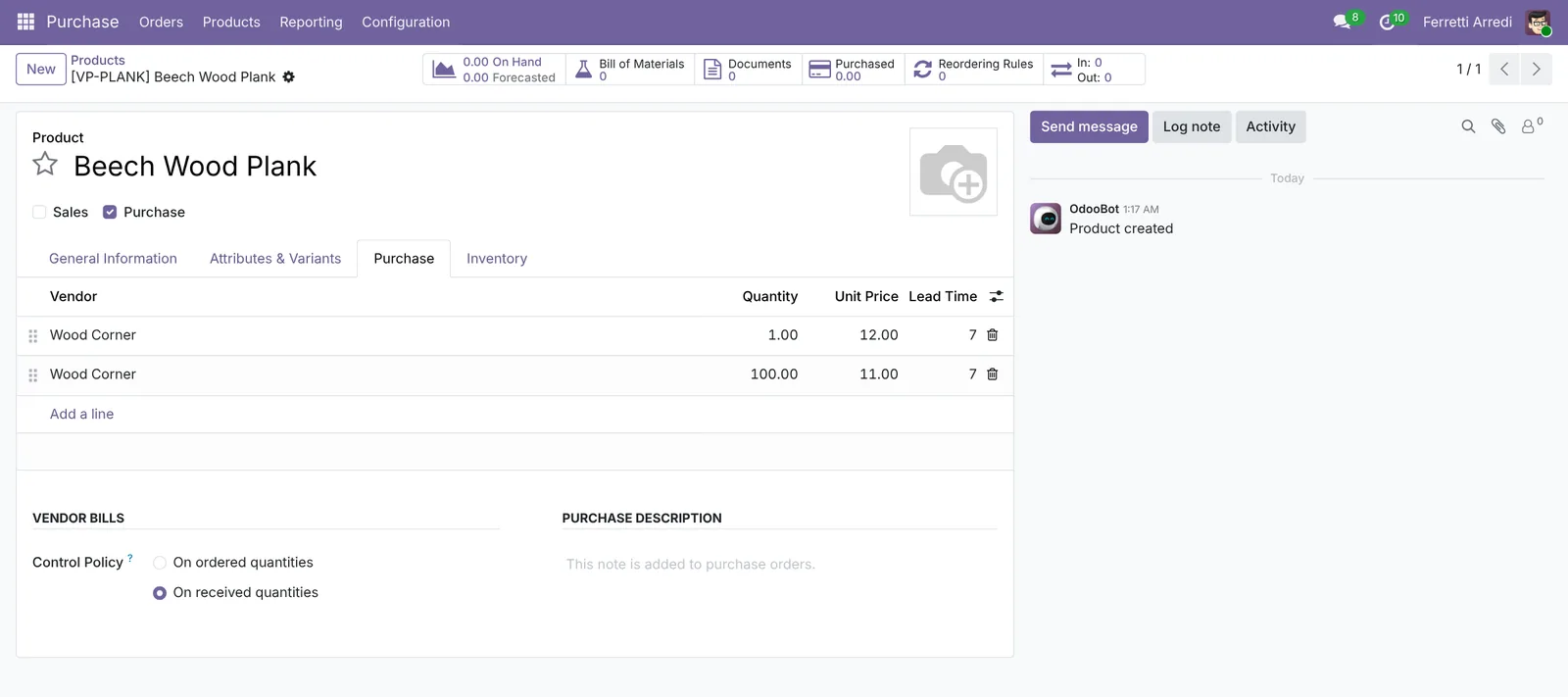 One vendor, two quantity breaks, one lead time.
The order of the lines matters: Odoo takes the first one that fits. Drag your preferred vendor to the top.
2. See every vendor price in one list
Open Purchase → Configuration → Vendor Pricelists. Every vendor line of every product is here: search a vendor to see all their prices together, or a product to compare vendors.
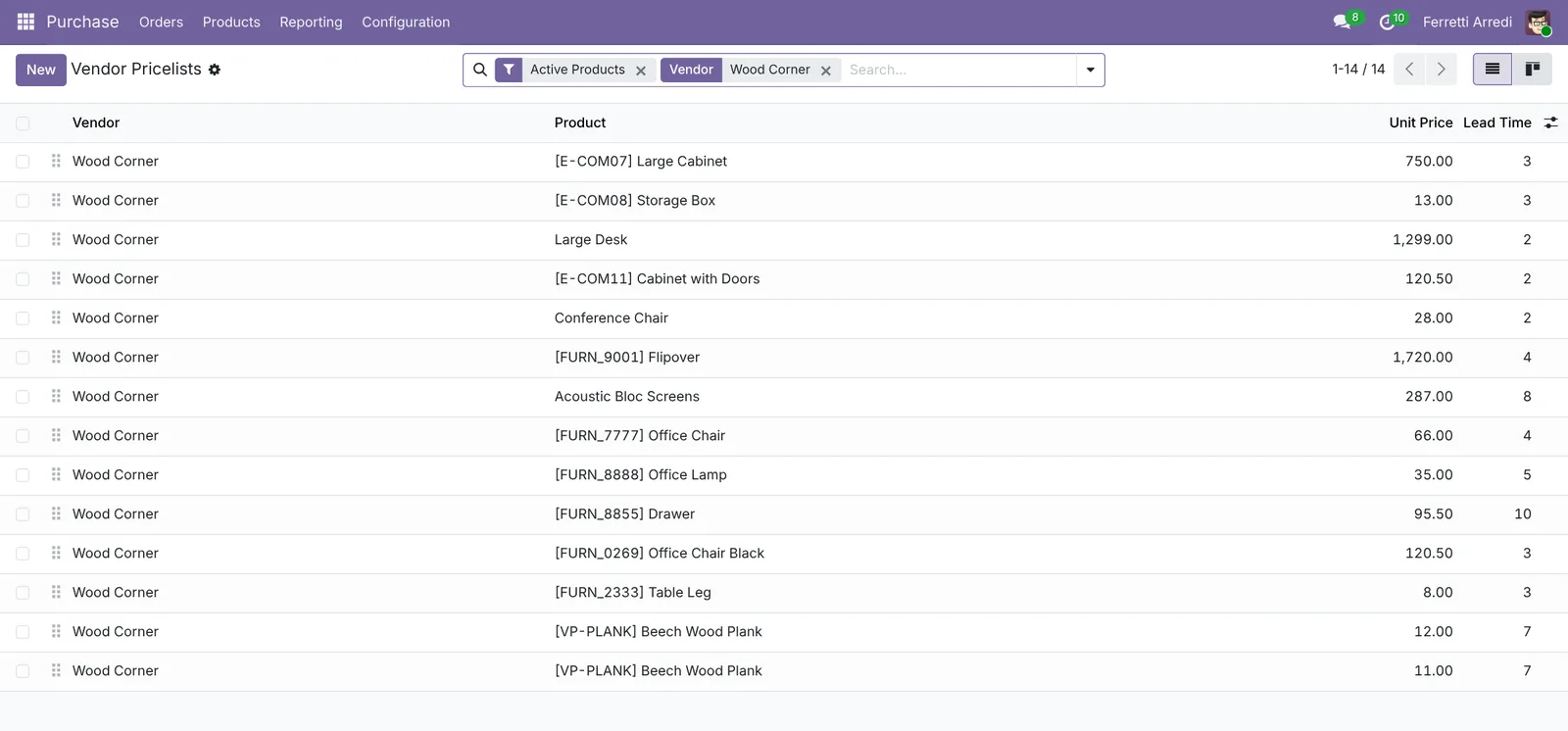 All of Wood Corner’s prices on one screen: the place to check them.
3. Odoo uses them on the request for quotation
Open Purchase → Orders → Requests for Quotation, press New, pick Wood Corner and add 150 Beech Wood Planks. Odoo fills $11.00 (the 100 break) and sets Expected Arrival 7 days ahead, from the lead time.
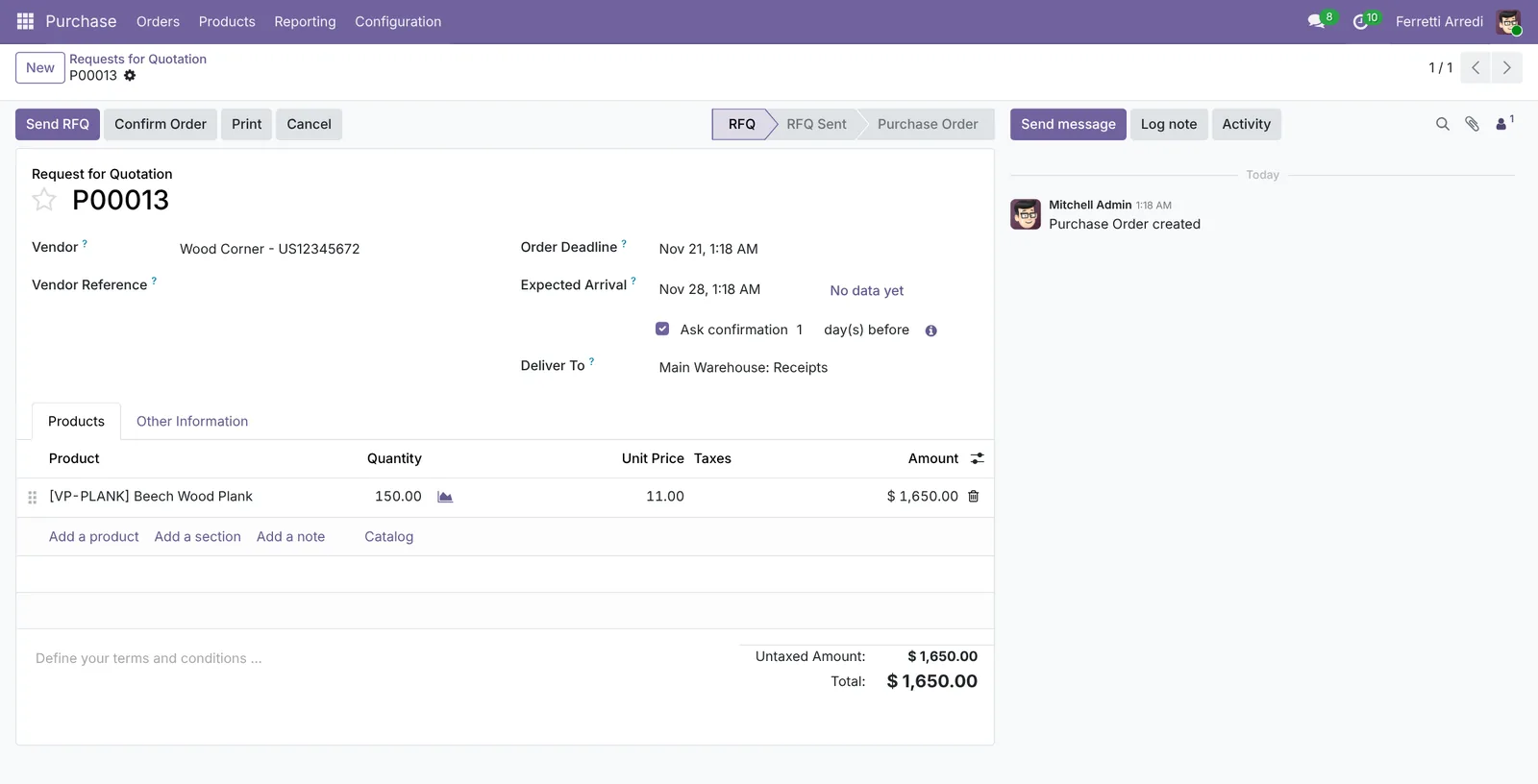 The price and the date come from the vendor line, right or wrong.
That’s why the lines must be right: the price on every order, the arrival date and, with reordering rules, the moment Odoo reorders all come from them.
4. Keep them up to date
When a bill comes in at a different price, or a delivery takes longer, open the vendor line (from the product or from Vendor Pricelists) and change the Unit Price or the Lead Time. Odoo won’t do it by itself: it adds a line for a new vendor when you confirm their first order, but it never corrects an existing one.
Common mistakes
- Trusting the price on the order. It’s the price list’s, not the vendor’s latest: compare it with the last bill before you send.
- Leaving the lead time at the default. A 7-day lead time for a vendor who takes 14 makes every reorder a week late.
- Quantity breaks the vendor never applies. If they bill $13.20 on 200 planks, an $11 line from 100 only makes your orders look cheaper.
- Two vendors in the wrong order. Odoo picks the first line that fits: the preferred vendor goes on top.
Vendor prices with AI: ask your AI assistant through MCP
With the Hawklify MCP server, Claude, ChatGPT and other assistants work in your Odoo as you, with your permissions. Odoo keeps the vendor lines, the bills and the receipts, but nobody compares them: the drift shows up only as a smaller margin. An assistant reads all three and tells you which line is out of date.
Once a month, in the desktop app. Card mode is on: the assistant compares prices and lead times with the last bills and receipts, and the update waits on an approval card.
Two of three have drifted:
- Beech Wood Plank, Wood Corner: Odoo says $12.00 and 7 days. The last three bills were $13.20 and the planks took 13, 14 and 15 days. Every order is planned a week too early.
- Oak Veneer Sheet, Lumber Inc: Odoo says $25.00; they billed $23.75 twice. Delivery in 9 and 10 days, as listed.
Steel Table Leg from Ready Mat is right: $8.50 and 5 days, as billed.
The update:
Approval needed in OdooUpdate
Wood Corner's plank price to $13.20 and 14 days; Lumber Inc's veneer price to $23.75.
product.supplierinfo · 2 records
Wood Corner · Beech Wood Plank
| Field | Current | New |
|---|---|---|
| Price | $13.20 | |
| Delivery lead time | 14 days |
Lumber Inc · Oak Veneer Sheet
| Field | Current | New |
|---|---|---|
| Price | $23.75 |
Change applied in Odoo.
Organisation administrators can turn the approval cards off on the Members page.
Done. New requests for quotation now start at $13.20 for planks and $23.75 for veneer, and plank orders expect delivery in 14 days, so reordering starts a week earlier.
The $1.20 a plank adds up: on the last three orders that's $720 you didn't see coming (600 planks). Want me to ask Wood Corner whether the old price comes back from 100 planks?
On a request for quotation, in the browser. The assistant checks the price and the date against what the vendor really did, and asks once before writing to them.
Neither, probably:
- $11.00 comes from the break at 100 planks, but Wood Corner has never billed it. Their last three bills were $13.20 a plank, on orders of 200 planks.
- Arrival in 7 days: their last three deliveries took 13 to 15 days.
If they bill $13.20, this order costs $1,980, not $1,650. Ask Wood Corner on the RFQ to confirm $11.00 and a date for 150 planks?
Sent on P00013: please confirm $11.00 a plank for 150 and the delivery date.
Until they answer, plan the planks for December 5, not November 28.
Versions we tested
| Version | Result |
|---|---|
| Odoo 16 | Same steps. The Quantity column is hidden in the product’s vendor list: show it from the optional columns (the icon at the end of the header). |
| Odoo 17 | Same as 16. |
| Odoo 18 | Same steps and screens as 19. |
| Odoo 19 | As in this guide. The screenshots come from Odoo 19. |
| Odoo 20 | Same steps. The request for quotation shows Arrival Confirmation next to Expected Arrival. |
Frequently asked questions
Does Odoo update the vendor price when the bill is different?
No. Odoo adds a vendor line the first time you confirm an order with a new vendor, but it doesn't change an existing price or lead time when the bill or the receipt say otherwise. Check them now and then, or ask the assistant below.
What does the lead time do?
It sets the Expected Arrival of the request for quotation (order date plus lead time) and, with reordering rules, how early Odoo orders.
Which line does Odoo pick when there are several?
The first vendor line that fits the quantity and the date, in the order of the list: put your preferred vendor on top. Quantity breaks of the same vendor are picked by the quantity ordered.
Can a vendor price be valid only for a while?
Yes. Show the optional columns Start Date and End Date in the vendor list and fill them: outside those dates Odoo ignores the line.
Questa guida è disponibile anche in italiano: Prezzi fornitore in Odoo: listini e tempi di consegna
Related Odoo guides
 PurchaseCalls for tenders in Odoo: compare vendor quotesAsk several vendors for the same goods in Odoo, compare prices and delivery dates line by line, confirm the best quote and cancel the rest. Community and Enterprise.
 PurchaseVendor bills in Odoo: pay only what you receivedOrder from a vendor in Odoo, receive part of the goods, and bill exactly what arrived, with the control policy on received quantities. Community and Enterprise.
 InventoryReordering rules in Odoo: restock before you run outSet min/max reordering rules in Odoo so it orders from your vendor before stock runs out, then use the Replenishment list to order now. Community and Enterprise.