Repairs in Odoo: repair orders, spare parts, warranty
Handle repairs in Odoo: a repair order for the customer's serial number, the spare parts out of stock, and the warranty, from order to repaired. Community and Enterprise.
- Community and Enterprise
- 3 min read
- Odoo + AI tutorial
A chair comes back with a snapped armrest. Is it still under warranty, which part does it need, and is the part in stock? Odoo Repairs keeps it all on a repair order: the customer, the product and its serial number, the spare parts that leave the stock, and whether the warranty pays. This guide repairs an office chair under warranty, from the order to the end of the repair.
It works the same in Community and Enterprise. The versions we tested are listed at the end.
This guide is also an AI tutorial. At the end, an AI assistant connected to Odoo opens a repair under warranty from a photo of a chair's label taken at the customer's, and finds the spare part that breaks most and sets a reordering rule for it.See it in action ↓Before you start
- The Repairs app installed. It installs Inventory too.
- To track products by serial number, turn on Lots & Serial Numbers in Inventory settings.
- The spare parts as storable products, with some in stock.
1. Create the repair order
Open Repairs and press New.
- Pick the Customer, here Uffici Moretti.
- Pick the Product to Repair, Office Chair Ergo,
- and its Lot/Serial, ERG-0423.
- The chair was delivered a year and a half ago, with a two-year warranty: tick Under Warranty, so the customer won’t pay for the repair.
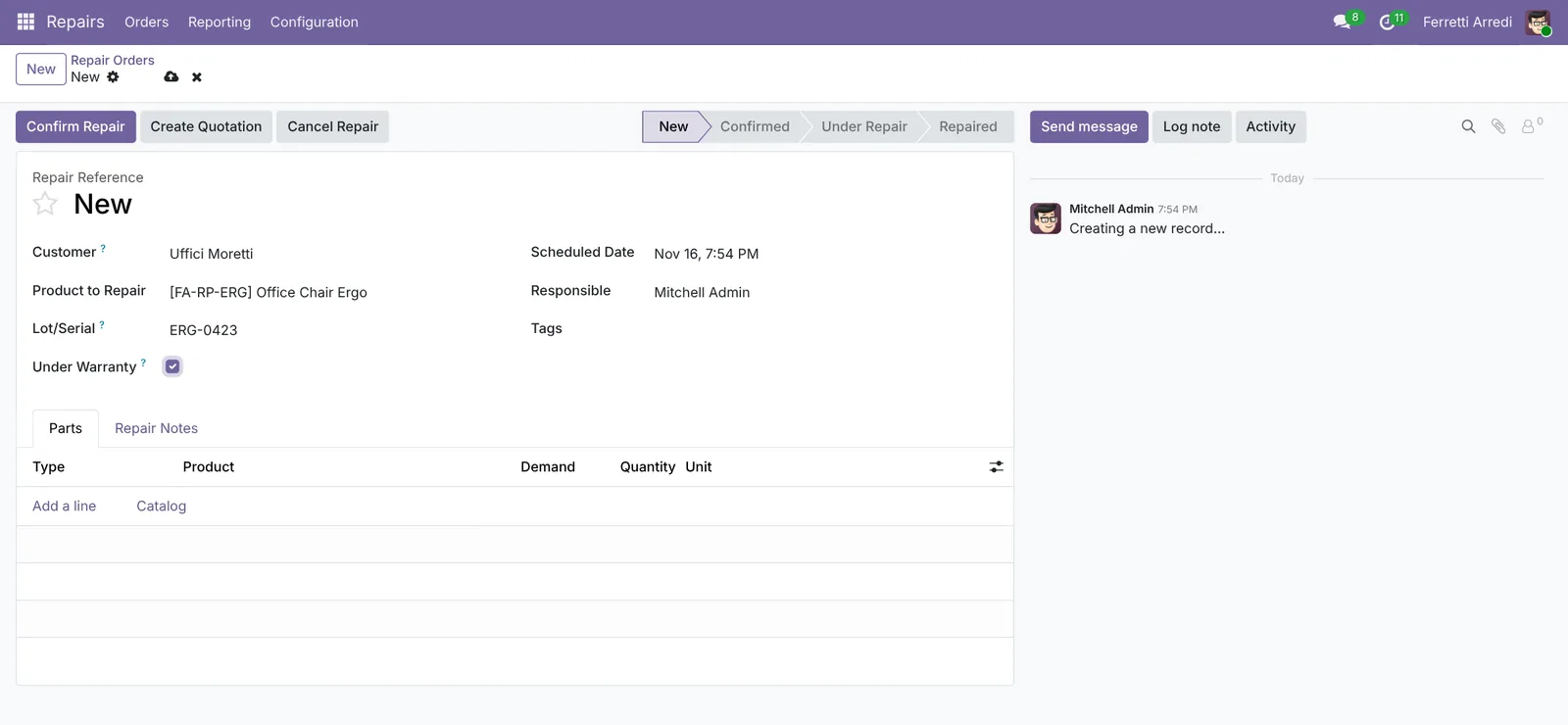 Who, what, which serial, and the warranty.
2. Add the spare parts
On the Parts tab, press Add a line and pick the part, here one Armrest Ergo. The line type is Add: the part goes into the chair, out of your stock. A green Available badge says it is in stock. Press Save.
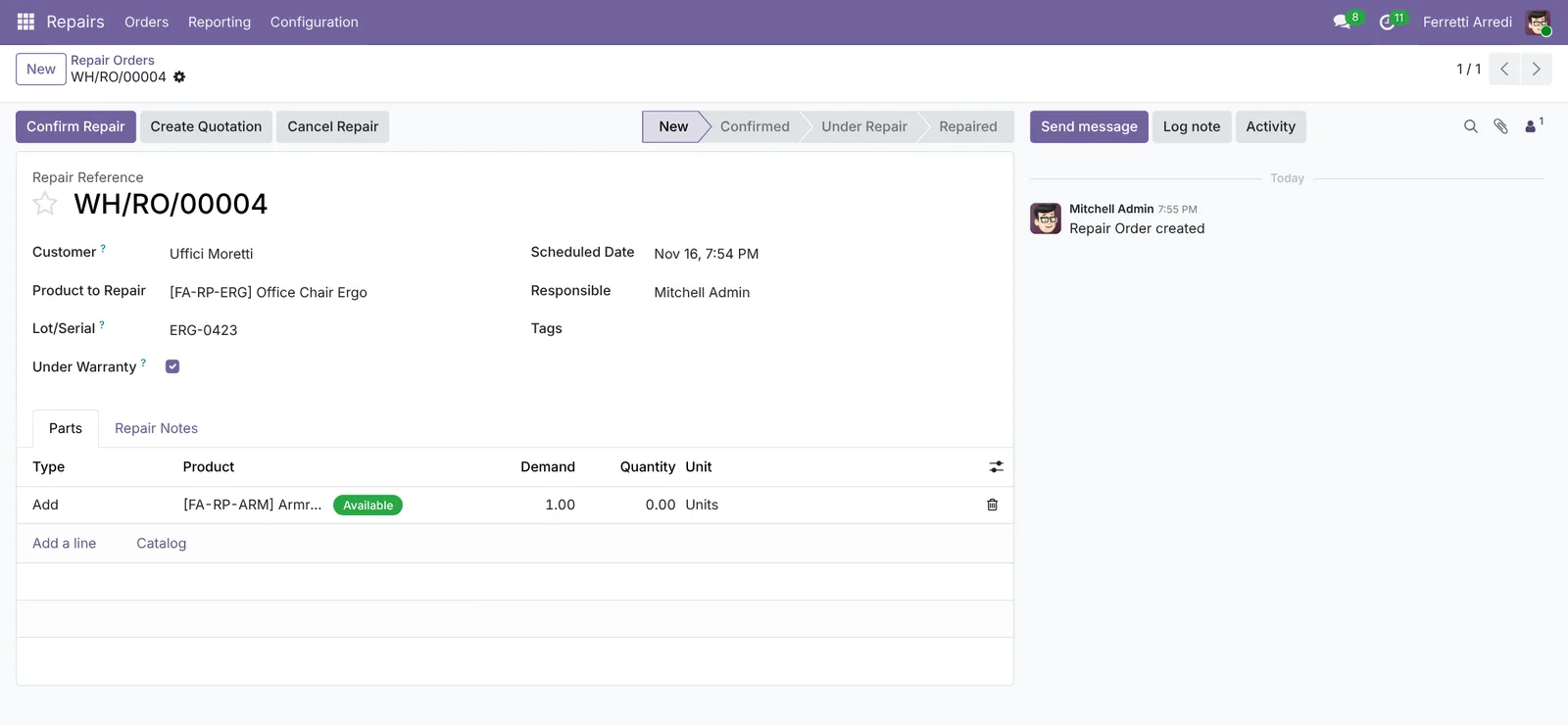 The part, and whether it is in stock.
3. Confirm, repair, done
Press Confirm Repair. The chair is still at the customer’s, so Odoo warns that there is not enough quantity to repair: press Confirm anyway. When the technician starts, press Start Repair. When it is fixed, press End Repair. The order is Repaired, and the armrest has left the stock (the Product Moves button shows it).
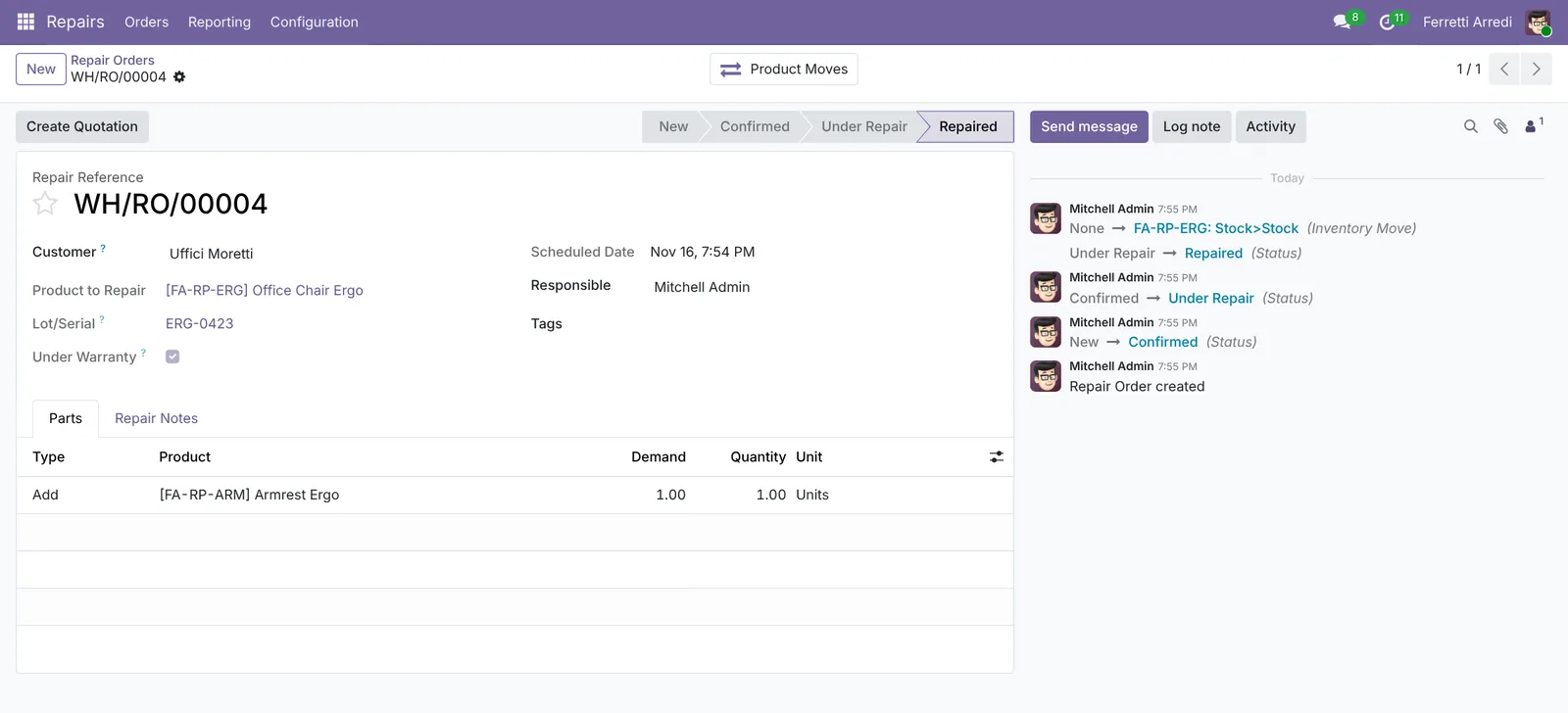 Repaired, with the part taken out of stock.
Common mistakes
- No serial number on the repair. Then the chair’s history is lost, and nobody sees it is the third repair.
- Warranty decided by memory. Check the delivery date of the serial number, not the customer’s word.
- Parts not in stock. Look at the badge on the part line before you promise a date.
- Charging a warranty repair. Tick Under Warranty before you create the quotation.
Repairs with AI: ask your AI assistant through MCP
With the Hawklify MCP server, Claude, ChatGPT and other assistants work in your Odoo as you, with your permissions. At the customer’s, the technician can’t open three menus to find when a chair was delivered and how long its warranty lasts.
At the customer’s, on the phone. Marco snaps the label under the seat and sends it to a chat assistant connected to Odoo through Hawklify. Depending on how your organisation set up the server, the assistant makes the change straight away or first shows you a card to approve. Here Smart mode is on: it asks once, in the chat.
Hawklify
Your Odoo, from the chat you already use
Send a message, a photo or a voice note: the assistant reads and works in Odoo through Hawklify, with your permissions.
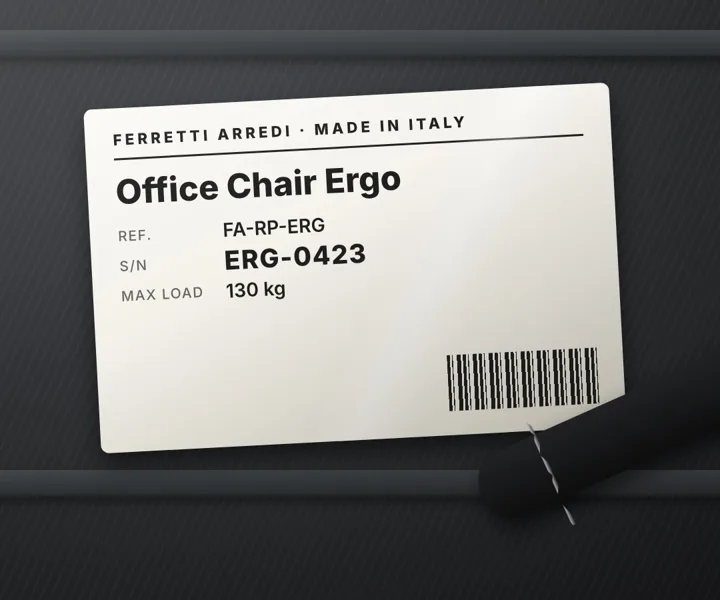
Uffici Moretti: armrest snapped on this one
Office Chair Ergo, serial ERG-0423. Delivered to Uffici Moretti on Jun 14, 2025 (WH/OUT/00057). The warranty is 2 years from delivery: covered until Jun 14, 2027.
Armrest Ergo: 6 in stock.
Open a repair order under warranty, with one new armrest?
Yes, open it
Done: WH/RO/00004 for Uffici Moretti, under warranty, with 1 Armrest Ergo. The delivery and the warranty date are in its notes. Bring the chair to the workshop.
On the computer, in card mode. The repair orders also tell you which part breaks most, and whether you have enough of it. Nothing changes until the card is approved:
Parts used in 23 repairs this year:
- Armrest Ergo: 14 used, more than one a month, and rising since the summer. 6 in stock, no reordering rule: at this pace, about 4 months.
- Gas Lift Ergo: 5 used. 9 in stock, with a reordering rule (min 3).
- Caster Set: 3 used. 12 in stock.
And 120 Office Chairs Ergo delivered in 2025 are still under warranty. I'd add a reordering rule on the armrest: min 4, max 10.
Approval needed in OdooCreate
Create a reordering rule for Armrest Ergo in WH/Stock: buy when it drops below 4, up to 10.
stock.warehouse.orderpoint · 1 record
Armrest Ergo · WH/Stock
| Field | Current | New |
|---|---|---|
| Min | 4 | |
| Max | 10 |
Change applied in Odoo.
Organisation administrators can turn the approval cards off on the Members page.
Not yet: 6 in stock, above the minimum of 4. When the next repairs bring it to 3, Odoo proposes a purchase of 7 from the usual vendor, enough to get back to 10.
Versions we tested
| Version | Result |
|---|---|
| Odoo 16 | Same steps. The warranty is a date, Warranty Expiration, instead of the Under Warranty box; a part line also asks for its source and destination locations. |
| Odoo 17 | As in this guide. |
| Odoo 18 | As in this guide. |
| Odoo 19 | As in this guide. The screenshots come from Odoo 19. |
| Odoo 20 | Same steps, without Start Repair: after Confirm Repair, press End Repair. |
Frequently asked questions
Does the customer pay for a repair under warranty?
No. With Under Warranty ticked, the parts and services on the repair are not charged: a quotation made from the repair order shows them at zero.
How do I charge a repair that is not under warranty?
Leave Under Warranty off and press Create Quotation: Odoo makes a sales quotation with the parts and services of the repair, which you send, confirm and invoice as usual.
Why does Odoo warn about an insufficient quantity when I confirm?
The product to repair is still at the customer's, so Odoo finds none in your stock. Confirm anyway, or receive the product first with a return, if you track where it is.
Can I see every repair of one serial number?
Yes. Open the lot or serial number in Inventory: its traceability shows the delivery, the repair orders and the parts used.
Questa guida è disponibile anche in italiano: Riparazioni in Odoo: ordini, componenti e garanzia
Related Odoo guides
 Projects & ServicesHelpdesk in Odoo: teams, SLA policies and ticketsSet up Odoo Helpdesk: turn on SLA policies, give urgent tickets a deadline, and take a ticket from new to solved with the answer e-mailed to the customer.
 InventoryLots and serial numbers in Odoo: trace every productTrack products by lot or serial number in Odoo: record the lot at reception, ship it, and find every customer who got it in seconds. Community and Enterprise.
 InventoryReordering rules in Odoo: restock before you run outSet min/max reordering rules in Odoo so it orders from your vendor before stock runs out, then use the Replenishment list to order now. Community and Enterprise.