Helpdesk in Odoo: teams, SLA policies and tickets
Set up Odoo Helpdesk: turn on SLA policies, give urgent tickets a deadline, and take a ticket from new to solved with the answer e-mailed to the customer.
- Enterprise
- 4 min read
- Odoo + AI tutorial
A customer writes three times, and nobody answers because the e-mail sat in a shared inbox. Odoo Helpdesk turns every request into a ticket, with an owner, a priority and a stage, and its SLA policies give each ticket a deadline you can see: solve urgent tickets within 4 working hours. This guide turns on SLAs for a team, adds a policy for urgent tickets, and takes a ticket from new to solved, with the answer e-mailed to the customer.
Helpdesk is an Enterprise app. The versions we tested are listed at the end.
This guide is also an AI tutorial. At the end, an AI assistant connected to Odoo reads every open ticket with the customers' e-mails and sales, and finds the three that can't wait, then checks the new tickets every morning before the team starts.See it in action ↓Before you start
- The Helpdesk app installed (Odoo Enterprise).
- A helpdesk team, here After-sales, with its stages: New, In Progress, Solved.
1. Turn on SLA policies for the team
Open Helpdesk → Configuration → Helpdesk Teams and open your team. In the Performance section, tick SLA Policies. The working schedule under it says which hours count. The two buttons at the top show the team’s tickets and its SLA policies.
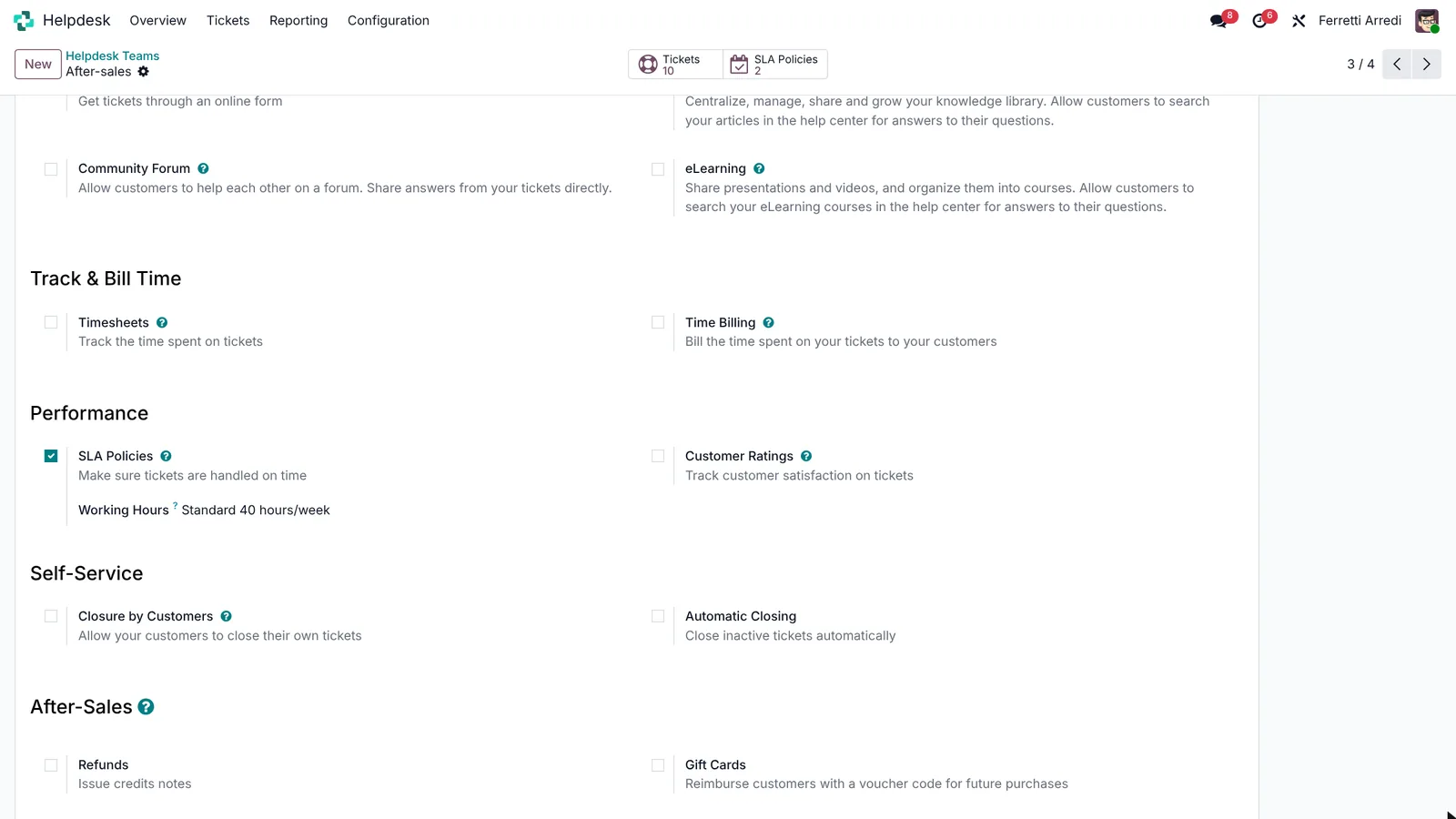 One box, and every ticket of the team gets a deadline.
2. Create an SLA policy
Open Helpdesk → Configuration → SLA Policies and press New.
- Name it, here Urgent tickets: solved within 4 hours.
- Pick the Helpdesk Team, After-sales.
- Choose the tickets it covers: the Priority with three stars, Urgent.
- The Reach Stage: Solved.
- Within: 4:00 working hours.
Press Save. Every urgent ticket of the team, new or open, now shows the deadline.
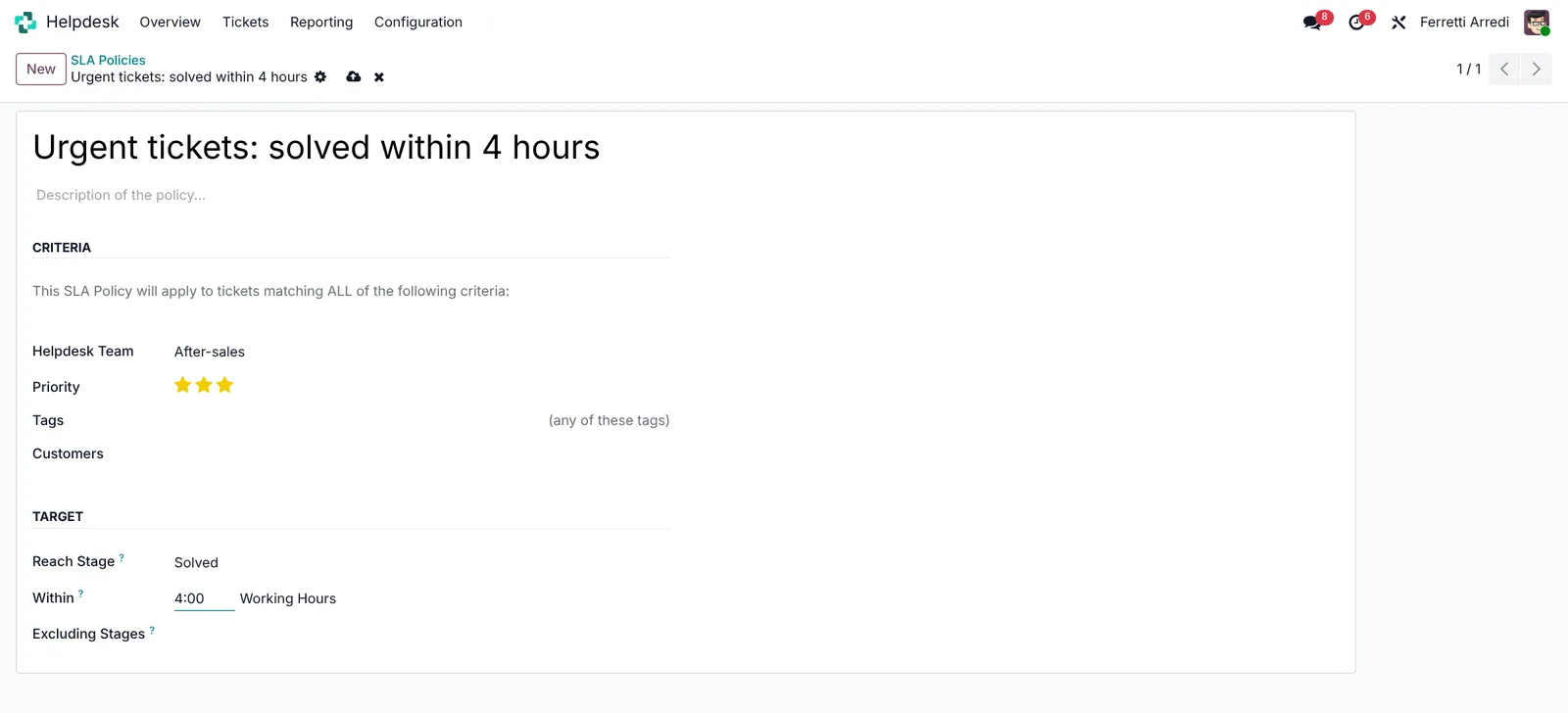 Which tickets, which stage, how long.
3. Open the team’s tickets
Back on the Overview, press Tickets on the team’s card. The tickets show as cards, one column per stage.
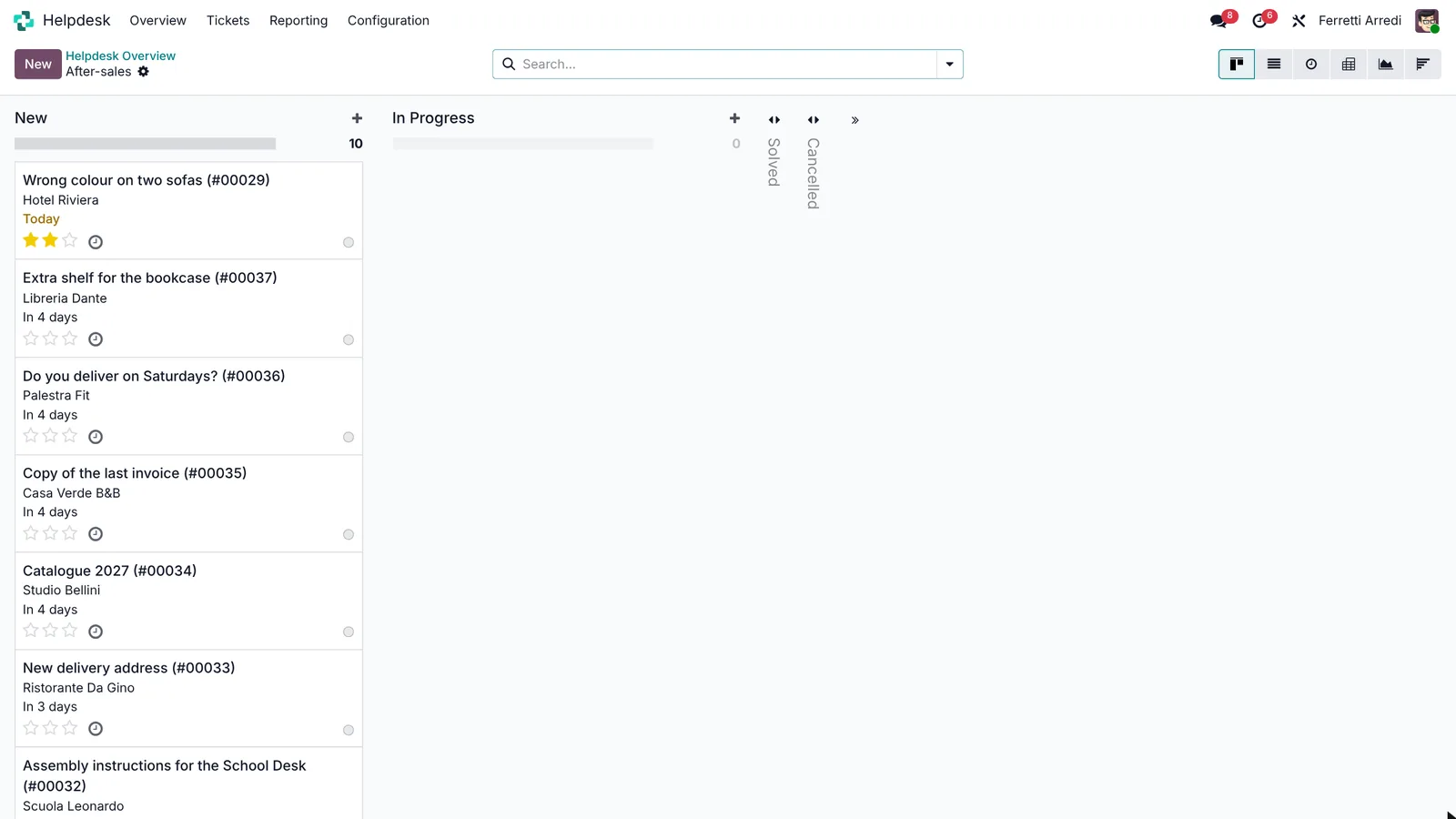 Every request in one place.
4. Assign, prioritise, answer and solve
Open a ticket, here Assembly instructions for the School Desk.
- In Assigned to, pick yourself.
- Set the Priority with the stars.
- Click In Progress in the status bar.
The green tag under the title is the SLA: it stays green while there is time.
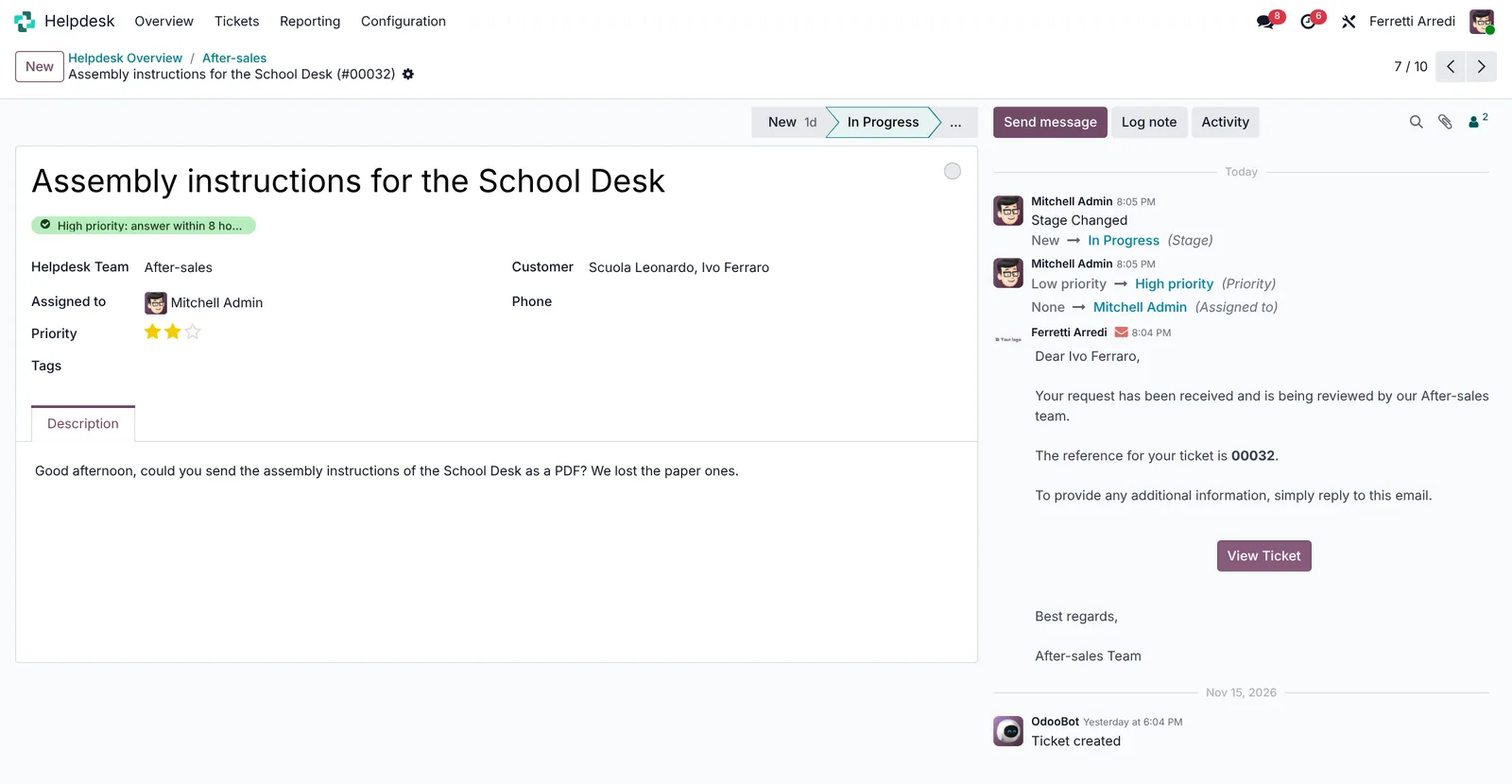 An owner, a priority, a deadline.
To answer, press Send message in the chatter, write the answer and send it: the customer gets it by e-mail, and the reply stays on the ticket. When it’s done, click Solved.
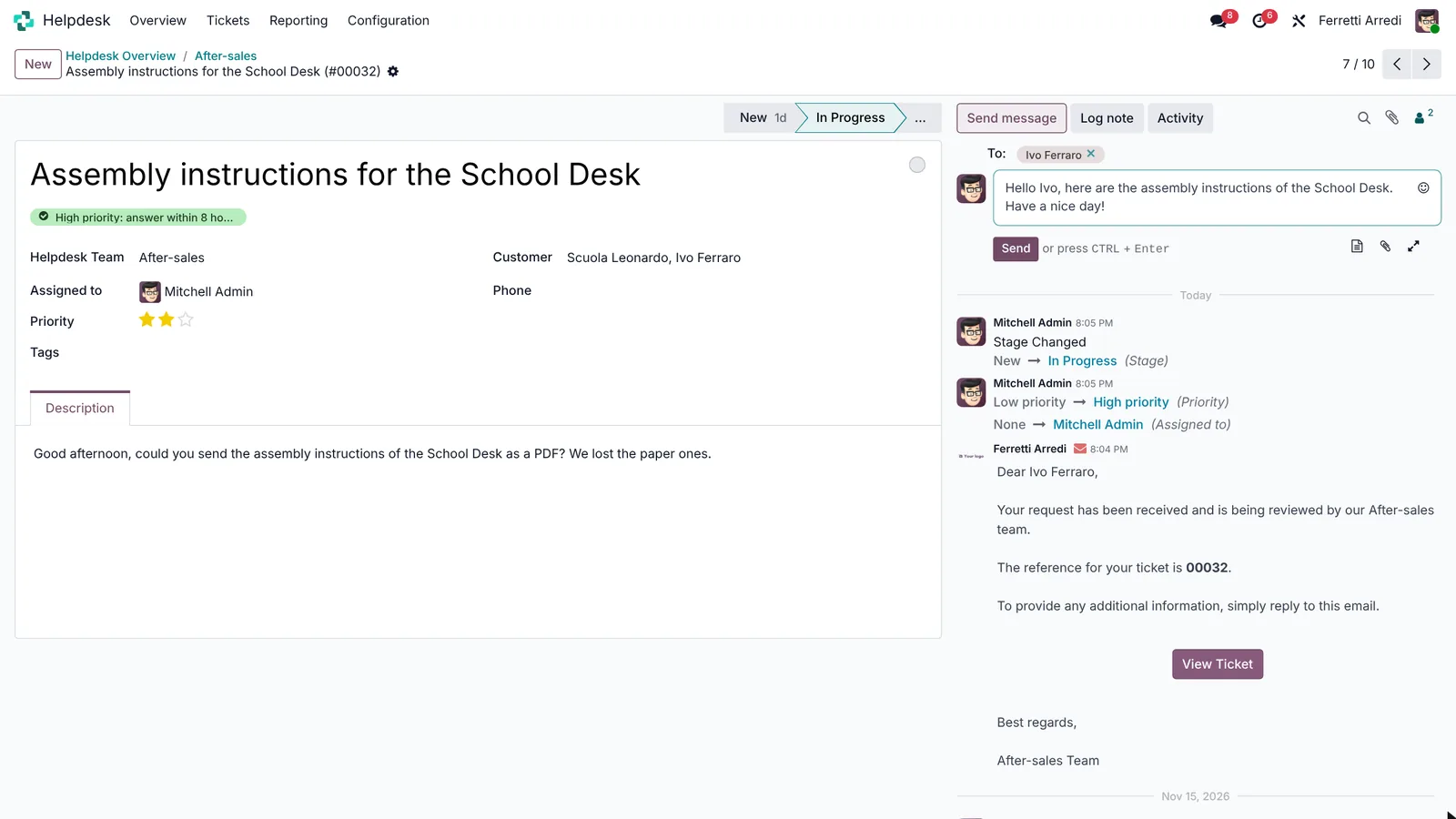 The answer goes by e-mail, and stays on the ticket.
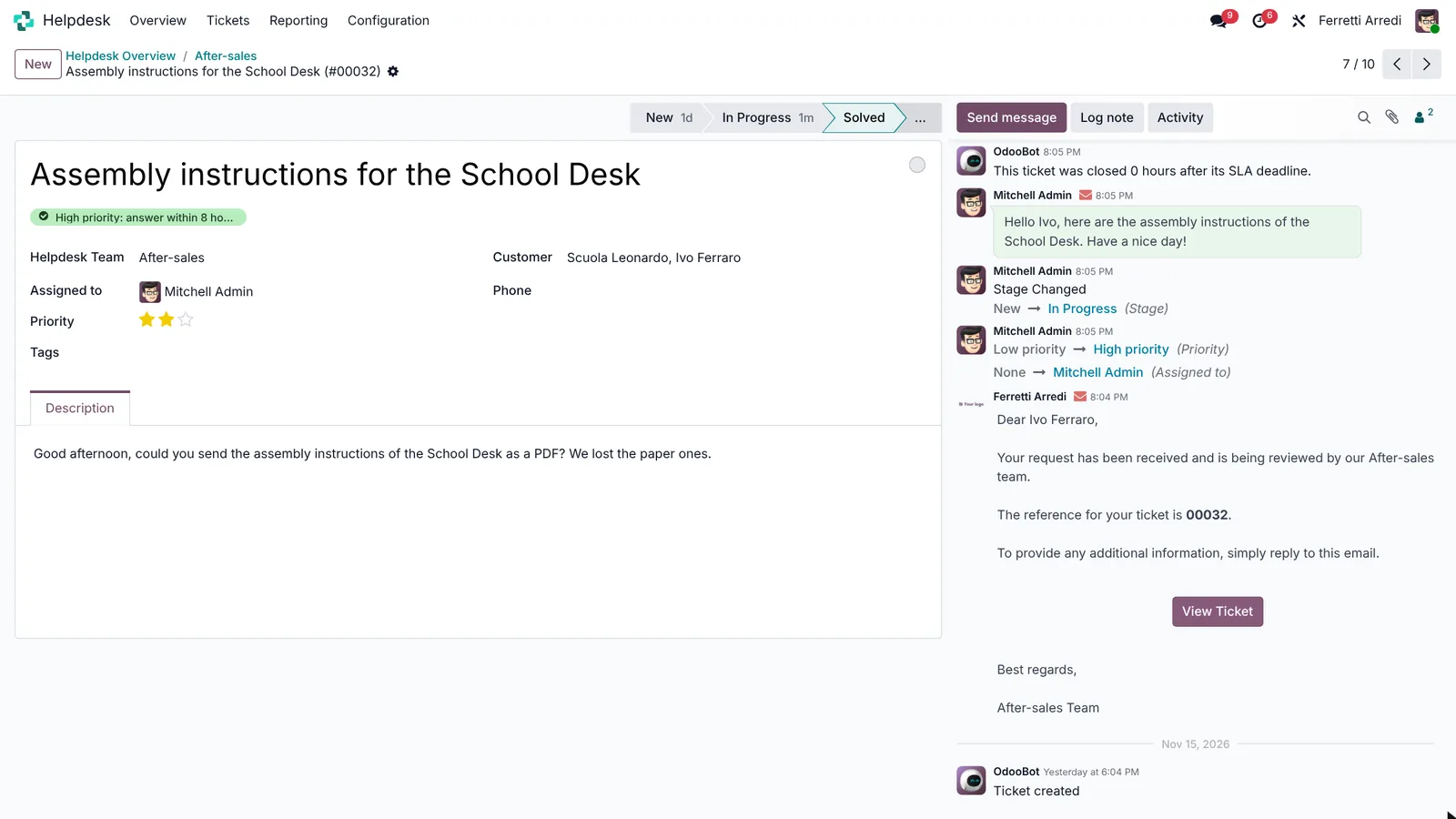 Solved.
Common mistakes
- Tickets nobody owns. An unassigned ticket is a ticket nobody answers. Check the team’s Unassigned count every morning.
- SLA on calendar hours. The deadline counts working hours: set the team’s working schedule right, or Friday evening tickets look late on Monday.
- One SLA for everything. A question about a catalogue and a wrong delivery are not equally urgent: one policy per priority.
- Answers outside Odoo. A reply from your own mailbox doesn’t land on the ticket, and the next colleague doesn’t see it.
Helpdesk with AI: ask your AI assistant through MCP
With the Hawklify MCP server, Claude, ChatGPT and other assistants work in your Odoo as you, with your permissions. The SLA says how much time is left, but not that the customer on the other end is your biggest one this year, or that this is their third e-mail.
On the computer, in card mode. The assistant reads every open ticket, the customers’ e-mails and this year’s sales. Depending on how your organisation set up the server, it makes the change straight away or first shows you a card to approve. Here nothing changes until the card is approved:
10 open tickets in After-sales. 3 need someone now:
- Hotel Riviera, Wrong colour on two sofas: high priority, SLA ends in 1 h 30, and nobody is on it.
- Studio Archi Moderni, Question about invoice INV/2026/00412: waiting 3 days. Your biggest customer this year: $96,400 in 3 orders.
- Bar Centrale, Outdoor tables delivered without legs: third e-mail with no answer. They open the terrace on Saturday, or they cancel the order.
The other 7 are simple questions with time left.
Make these 3 Urgent and assign them to Marc Demo?
Approval needed in OdooUpdate
Make the tickets of Hotel Riviera, Studio Archi Moderni and Bar Centrale Urgent and assign them to Marc Demo.
helpdesk.ticket · 3 records
Wrong colour on two sofas (#00029)
| Field | Current | New |
|---|---|---|
| Priority | Urgent | |
| Assigned to | Marc Demo |
Question about invoice INV/2026/00412 (#00030)
| Field | Current | New |
|---|---|---|
| Priority | Urgent | |
| Assigned to | Marc Demo |
Outdoor tables delivered without legs (#00028)
| Field | Current | New |
|---|---|---|
| Priority | Urgent | |
| Assigned to | Marc Demo |
Change applied in Odoo.
Organisation administrators can turn the approval cards off on the Members page.
All 3 are Urgent and Marc's. Start with Hotel Riviera (SLA in 1 h 30), then call Bar Centrale: send the legs today and tell them when. Studio Archi Moderni needs the invoice checked before the reply.
Every morning, on the phone. The same check runs by itself before the team starts, and the assistant asks once before it changes anything:
Hawklify
Your Odoo, from the chat you already use
Send a message, a photo or a voice note: the assistant reads and works in Odoo through Hawklify, with your permissions.
Good morning. 3 new tickets overnight in After-sales, nobody on them yet:
- Casa Verdi, Scratched door on a wardrobe: photo attached, SLA ends at 11:30.
- Studio Archi Moderni, When do the meeting tables arrive?: your biggest customer this year, low priority for now.
- Marco Valli, How do I clean the velvet cushions?: a simple question.
Marc already has the 3 urgent tickets from yesterday. Give these 3 to Mitchell Admin, and raise Studio Archi Moderni to High?
Yes, do it
Done: the 3 tickets are Mitchell's, Studio Archi Moderni is High. Mitchell starts with Casa Verdi, SLA at 11:30.
Versions we tested
| Version | Result |
|---|---|
| Odoo 16 | Same steps. The menu is Configuration → Teams, and an SLA policy also picks tickets by type, tags and customers. |
| Odoo 17 | As in this guide. |
| Odoo 18 | As in this guide. |
| Odoo 19 | As in this guide. The screenshots come from Odoo 19. Solved is folded under the … of the status bar. |
| Odoo 20 | Same steps. An SLA policy has no Priority field: under Tickets, press Add condition and choose Priority is Urgent. |
Frequently asked questions
How do e-mails become tickets?
Each helpdesk team can have an e-mail alias: every e-mail sent to it opens a ticket, and the customer's replies land in the same ticket's chatter.
What happens when an SLA deadline passes?
The SLA tag on the ticket turns red and the ticket counts as failed in the team's overview and in the SLA reports. Nothing is blocked: it is a signal to act on.
Do SLA hours count nights and weekends?
No. They are working hours, from the working schedule of the team, set next to the SLA Policies option.
Is Helpdesk in Odoo Community?
No. Helpdesk is an Enterprise app. In Community, a project with stages can do part of the job, without SLAs.
Questa guida è disponibile anche in italiano: Assistenza clienti in Odoo: team, SLA e ticket
Related Odoo guides
 Projects & ServicesRepairs in Odoo: repair orders, spare parts, warrantyHandle repairs in Odoo: a repair order for the customer's serial number, the spare parts out of stock, and the warranty, from order to repaired. Community and Enterprise.
 SalesSales orders in Odoo: from quotation to invoiceTake a sale through Odoo from start to finish: create the quotation, confirm the order, deliver the goods and post the invoice. Community and Enterprise.
 CRMCRM pipeline in Odoo: stages, activities, lost reasonsSet up the Odoo CRM pipeline: add and order stages, create opportunities, plan the next activity and mark lost deals with a reason. Community and Enterprise.