Recruitment in Odoo: job positions, applicants, interviews
Hire with Odoo Recruitment: open a job position, follow each applicant from new to interview, and refuse the others with a kind e-mail. Community and Enterprise.
- Community and Enterprise
- 4 min read
- Odoo + AI tutorial
A job ad that works brings dozens of CVs, and each one takes a few minutes to read. Odoo Recruitment puts every application on a card in the pipeline of its job position, with the CV right next to the form, and moves it from New to First Interview to Contract Signed. Those who don’t fit get refused with a reason, and a polite e-mail, in two clicks. This guide opens a job, reads an application, books a first interview and refuses a CV that doesn’t fit.
It works the same in Community and Enterprise. The versions we tested are listed at the end.
This guide is also an AI tutorial. At the end, an AI assistant connected to Odoo reads eight CVs against the job's requirements and moves the right three to First Interview, then books their interviews in a free morning and e-mails each applicant.See it in action ↓Before you start
- The Recruitment app installed.
- To read the CVs inside Odoo (and let an assistant read them), install Attachments List and Document Indexation too.
1. Open a job position
Open Recruitment and press New. Type the name of the job, here Sewing Machine Operator, and press Create. The job gets its own card on the Job Positions page, and its own pipeline. In the job’s Configure menu you can add the description, the requirements and how many people you want to hire.
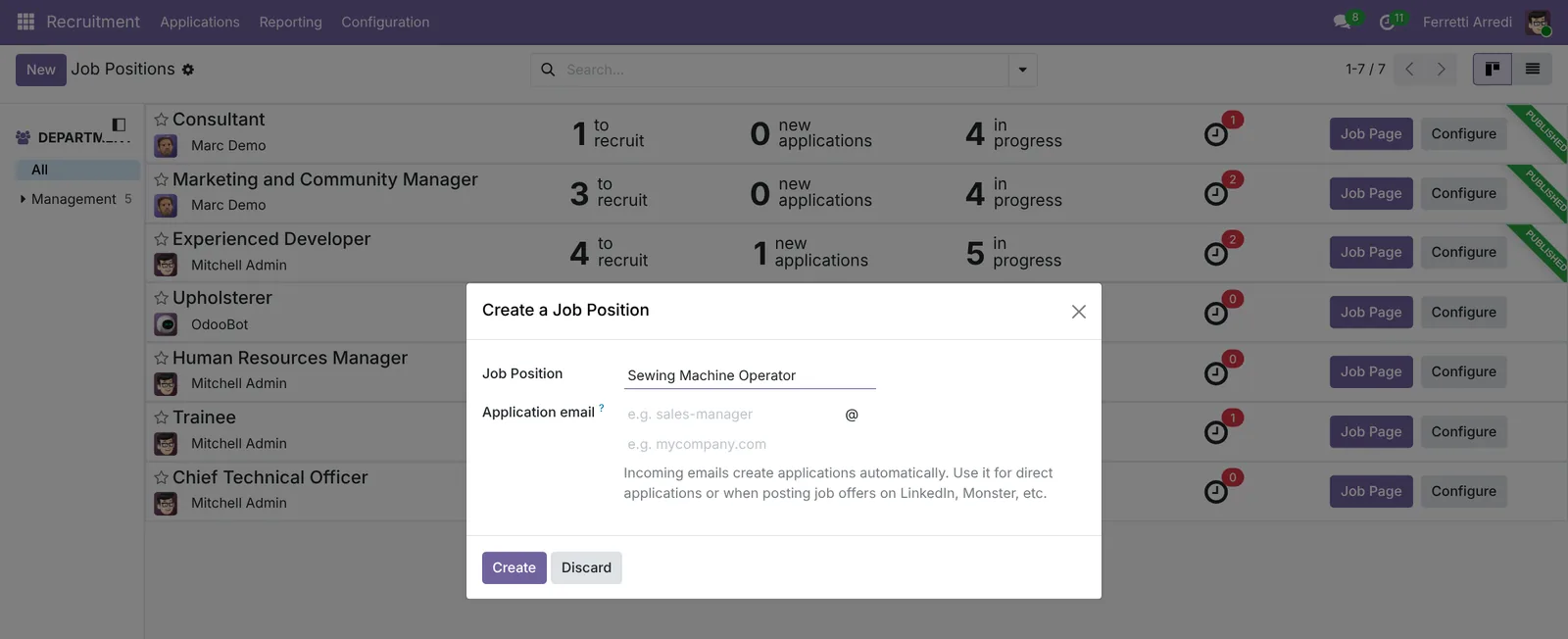 One job, one pipeline.
2. Open the applications
On the card of a job, open its applications. Each application is a card in the first stage, New. Here the Upholsterer job has eight, each with a CV attached.
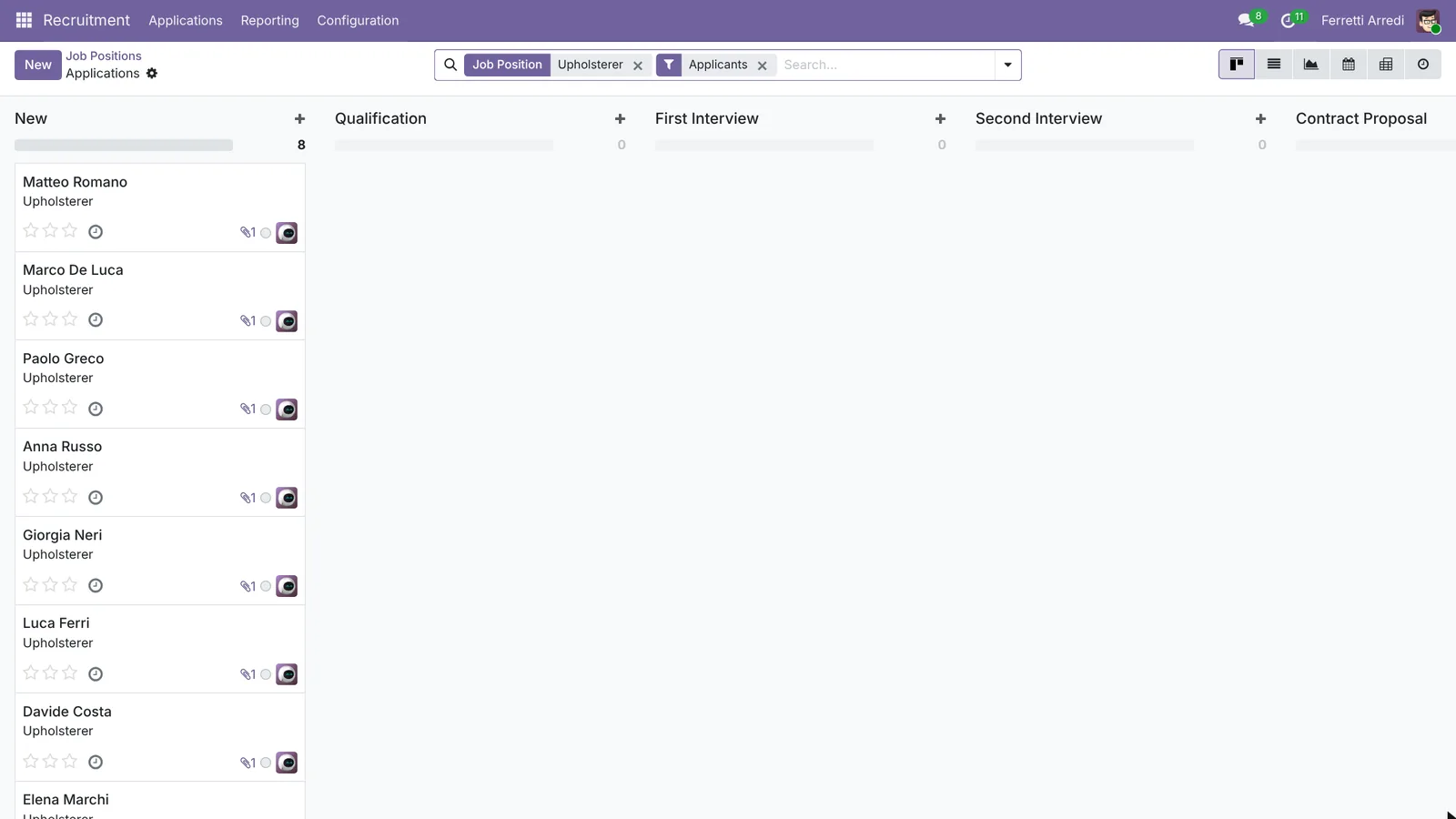 Eight CVs waiting in New.
3. Read the CV and book a first interview
Open an application. The CV is shown right next to the form, so you read it without downloading anything. A good fit? Click First Interview in the status bar: the applicant moves on in the pipeline.
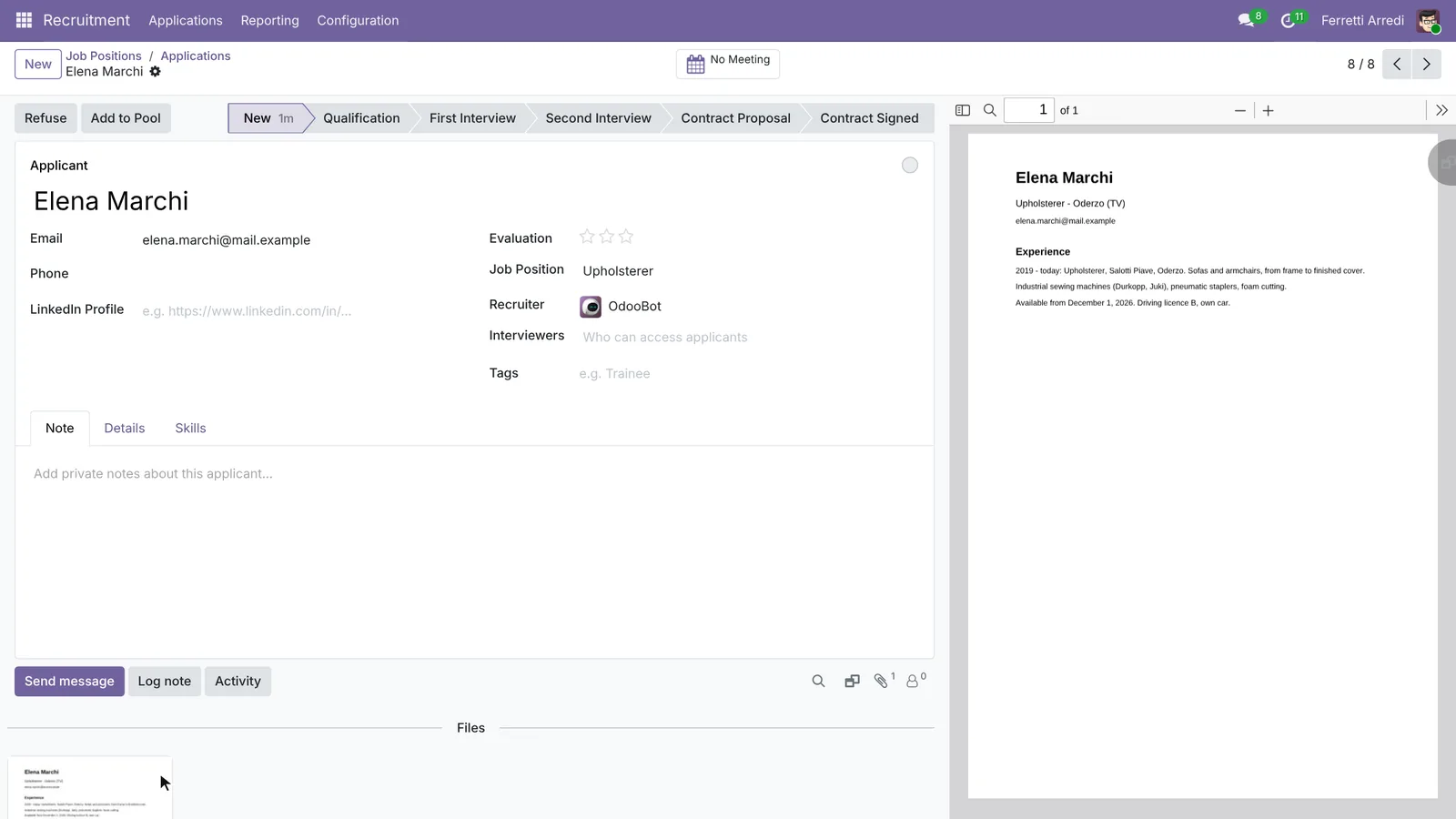 The CV next to the application.
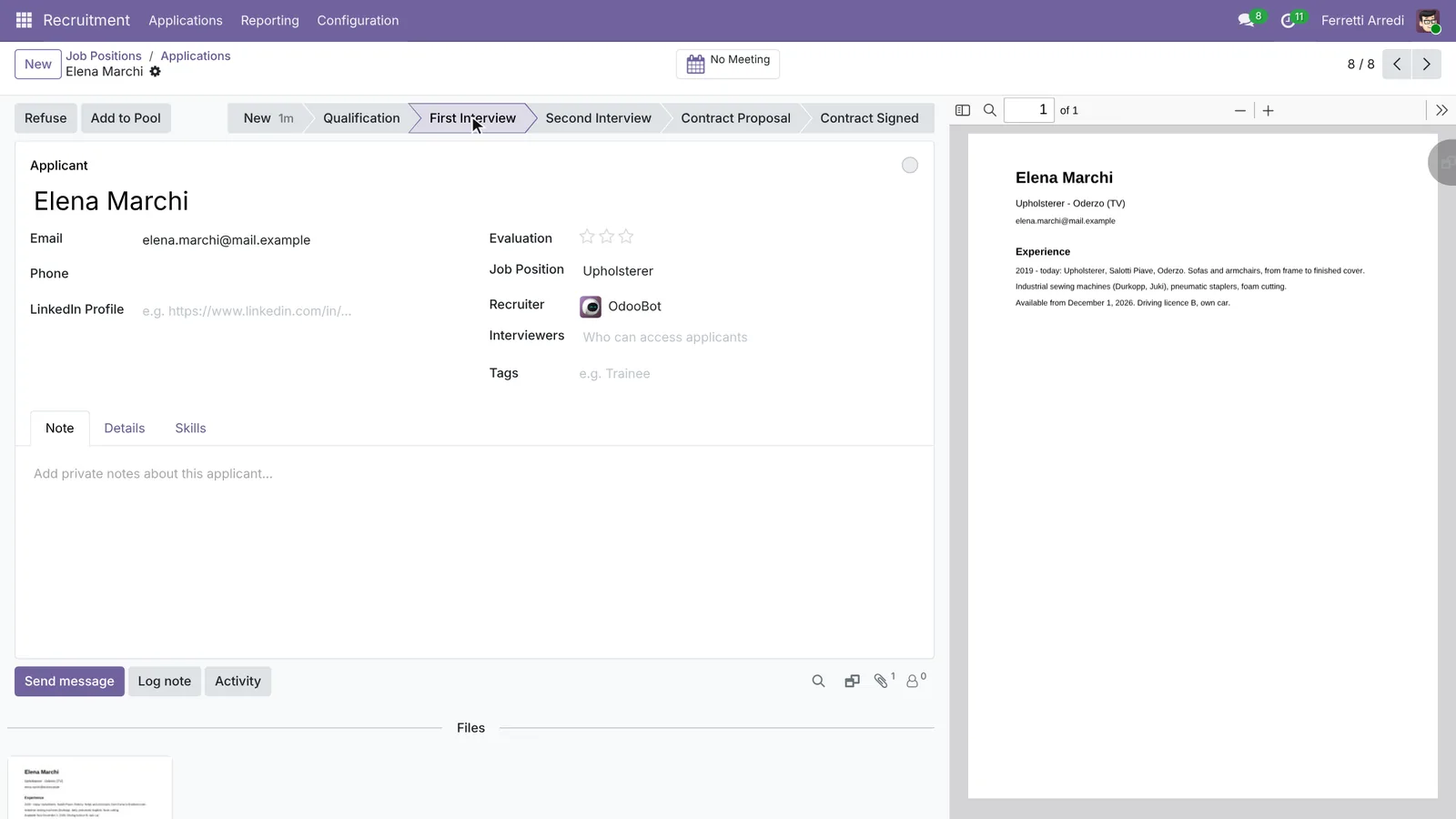 One click to the next stage.
4. Refuse with a reason
Go back to the pipeline and open an applicant who doesn’t fit, here a graphic designer. Press Refuse and pick the reason, here Does not fit the job requirements. With Send Email on, Odoo prepares a polite e-mail from the reason’s template. Press Refuse: the application leaves the pipeline, and the reason stays for your reports.
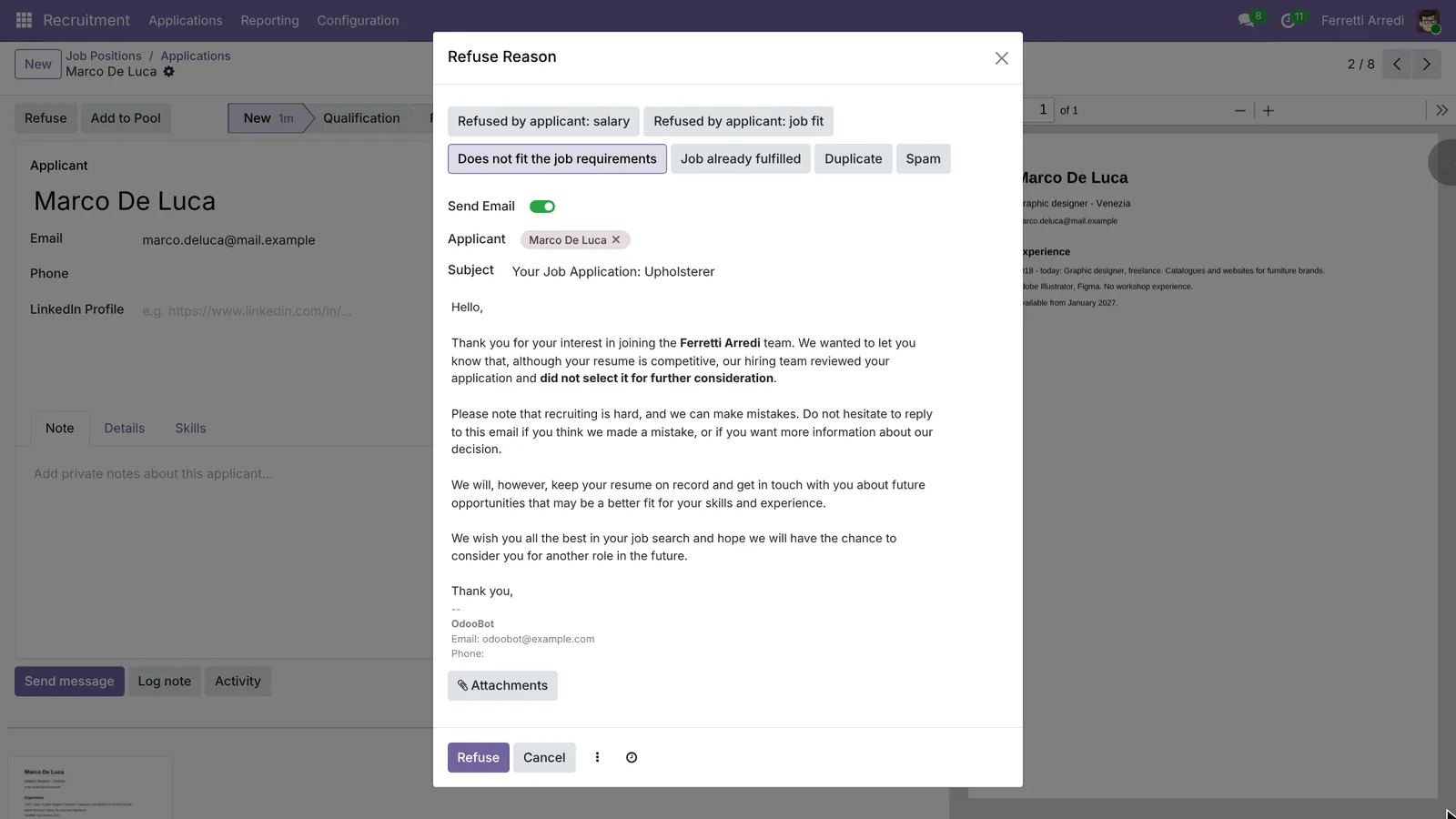 A reason for the reports, an e-mail for the applicant.
Common mistakes
- CVs that stay in New for weeks. Good applicants accept another job. Look at the pipeline every day or two.
- Refusing without a reason. The reasons are what tell you, later, why a job is hard to fill.
- One job for different roles. Each job has its own requirements and pipeline: a sewing operator and an upholsterer are two jobs.
- PDFs Odoo can’t read. Without document indexation, Odoo keeps the file but not its text, and nobody can search it.
Recruitment with AI: ask your AI assistant through MCP
With the Hawklify MCP server, Claude, ChatGPT and other assistants work in your Odoo as you, with your permissions. Reading eight CVs against four requirements is exactly the kind of work an assistant does in seconds, and a keyword search gets wrong: the tailor who sewed sofa covers for three years fits, the “senior upholsterer” who only works in Milan does not.
On the computer, in card mode. The assistant reads the job’s requirements and every CV attached in Odoo. Depending on how your organisation set up the server, it makes the change straight away or first shows you a card to approve. Here nothing moves until the card is approved:
The job asks for 3+ years on sofas or armchairs, an industrial sewing machine and a stapler, work on site in Treviso, and a start by January 11.
Interview these 3:
- Elena Marchi: upholsterer at Salotti Piave since 2019, sofas from frame to cover. Free Dec 1.
- Davide Costa: 4 years on car seats, same machines and staplers. Free Jan 4.
- Luca Ferri: his title says Tailor, but 3 years sewing sofa covers at Divani Rizzo. Free now.
Not now:
- Giorgia Neri: 10 years, but Milan or remote only.
- Anna Russo: free only from April 2027.
- Paolo Greco: one year as an apprentice.
- Marco De Luca and Matteo Romano: never upholstered.
Move the three to First Interview?
Approval needed in OdooUpdate
Move Elena Marchi, Davide Costa and Luca Ferri, the three Upholsterer applicants who meet every requirement, to First Interview.
hr.applicant · 3 records
Elena Marchi
| Field | Current | New |
|---|---|---|
| Stage | First Interview |
Davide Costa
| Field | Current | New |
|---|---|---|
| Stage | First Interview |
Luca Ferri
| Field | Current | New |
|---|---|---|
| Stage | First Interview |
Change applied in Odoo.
Organisation administrators can turn the approval cards off on the Members page.
Elena, Davide and Luca are in First Interview. For the others: refuse Paolo, Marco and Matteo with Does not fit the job requirements. Keep Anna Russo in mind for spring: she is free from April, and the job asks for 2 people.
In the browser, next to the pipeline. Once the interviews are decided, the assistant books them for the interviewer and writes to each applicant:
Marc is free on Thursday Nov 19 from 9:00 to 12:30, then busy all afternoon. Three interviews of 45 minutes, at the Treviso workshop:
- 9:00 Elena Marchi
- 10:00 Davide Costa
- 11:00 Luca Ferri: he asked to see the sewing machines, so the interview starts in the workshop.
Book them and e-mail each applicant?
Done: 3 interviews on Thursday, each in Marc's calendar and on its application. Elena, Davide and Luca have the time, the address and who they'll meet. Their answers will land in the applications' chatter.
Versions we tested
| Version | Result |
|---|---|
| Odoo 16 | Same steps. New opens the small Create a Job Position window; the applications open from the job card’s new applications button. An application also has a subject line. |
| Odoo 17 | As in Odoo 16. |
| Odoo 18 | Same steps. An application is linked to a Candidate, who keeps the person’s details across several jobs. |
| Odoo 19 | As in this guide. The screenshots come from Odoo 19. |
| Odoo 20 | Same steps. New opens the full job form: type the name and Save. |
Frequently asked questions
Where do applications come from?
From the job page on your Odoo website, from the job's e-mail address (each CV sent there becomes an application), or typed in by hand. The CV is attached to the application in every case.
Can I change the stages of the pipeline?
Yes. In Recruitment, Configuration, Stages, add, rename or reorder them, and choose an e-mail template per stage if you want the applicant to get a message when they reach it.
Does the applicant get an e-mail when refused?
Only if you leave Send Email on in the refuse window. The text comes from the template of the refuse reason, so it can be different for each reason.
Can Odoo search inside the PDF CVs?
Yes, with the Attachments List and Document Indexation module (attachment_indexation) installed: Odoo keeps the text of each PDF, so a search, or an AI assistant, can read it.
Questa guida è disponibile anche in italiano: Assunzioni in Odoo: posizioni, candidature e colloqui
Related Odoo guides
 Human ResourcesEmployee onboarding in Odoo: plans and activitiesOnboard new employees with Odoo: set up the onboarding plan once, launch it on the new hire, and every first-week task becomes an activity. Community and Enterprise.
 AccountingExpenses in Odoo: from receipt to reimbursementHandle employee expenses in Odoo: record an expense with its receipt, submit it, approve it, post it to accounting and pay the employee back. Community and Enterprise.
 CRMDuplicate contacts in Odoo: merge them, keep the historyFind duplicate customers in Odoo, merge them into one contact with every quotation, invoice and message, and let Odoo hunt for the rest. Community and Enterprise.