Loyalty Programs in Odoo: points, rewards and promotions
Set up a loyalty program and a promotion in Odoo: points per dollar spent, a $50 reward, 10% off big orders, and the reward applied on a quotation.
- Community and Enterprise
- 4 min read
- Odoo + AI tutorial
A customer who orders three times a year is worth more than one big order, and a reason to come back costs less than a new customer. Odoo’s Loyalty programs give customers points on every order and let them spend the points on a discount; promotions reward an order on the spot, such as 10% off above $1,000. This guide turns them on, creates a club card with a $50 reward, adds an autumn promotion and applies it to a quotation.
It works the same in Community and Enterprise. The versions we tested are listed at the end.
This guide is also an AI tutorial. At the end, an AI assistant connected to Odoo gives a club card to the best customers who don't have one, and every Monday reminds the members who have a reward waiting and stopped ordering.See it in action ↓Before you start
- The Sales app installed.
- A product to sell, here a Velvet Sofa 3-Seat at $1,290 from Ferretti Arredi.
1. Turn on promotions and loyalty
Open Sales → Configuration → Settings. In the Pricing section tick Promotions, Loyalty & Gift Card and press Save. The menu Sales → Products → Discount & Loyalty appears.
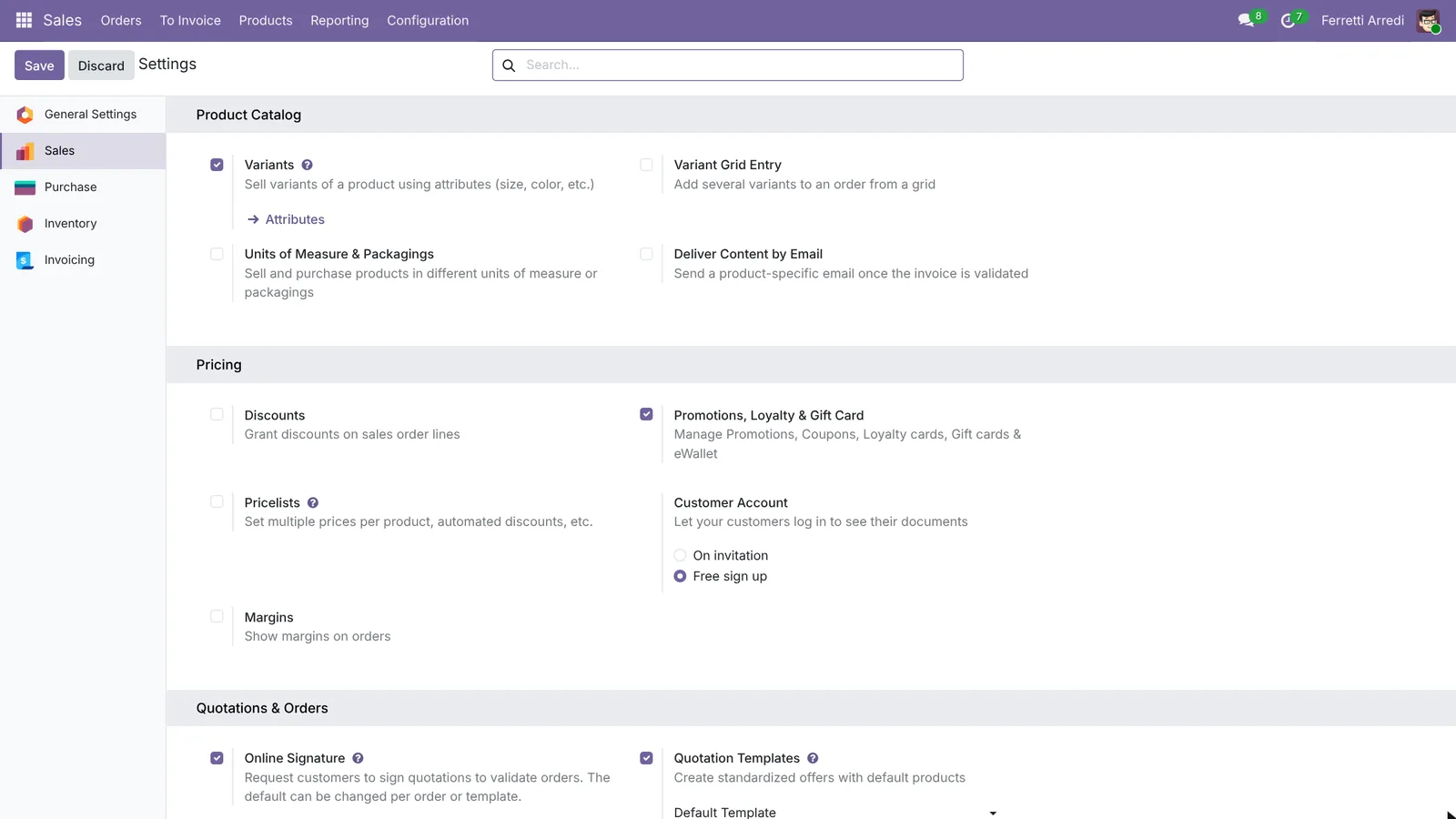 One tick for coupons, promotions, loyalty cards, gift cards and eWallet.
2. Create the loyalty program
Open Sales → Products → Discount & Loyalty and press New. Name it Ferretti Club and set Program Type to Loyalty Cards. Odoo fills in a rule and a reward:
- the rule gives 1 point per $ spent;
- open the reward and make it $50 on your order in exchange of 500 points.
Press Save.
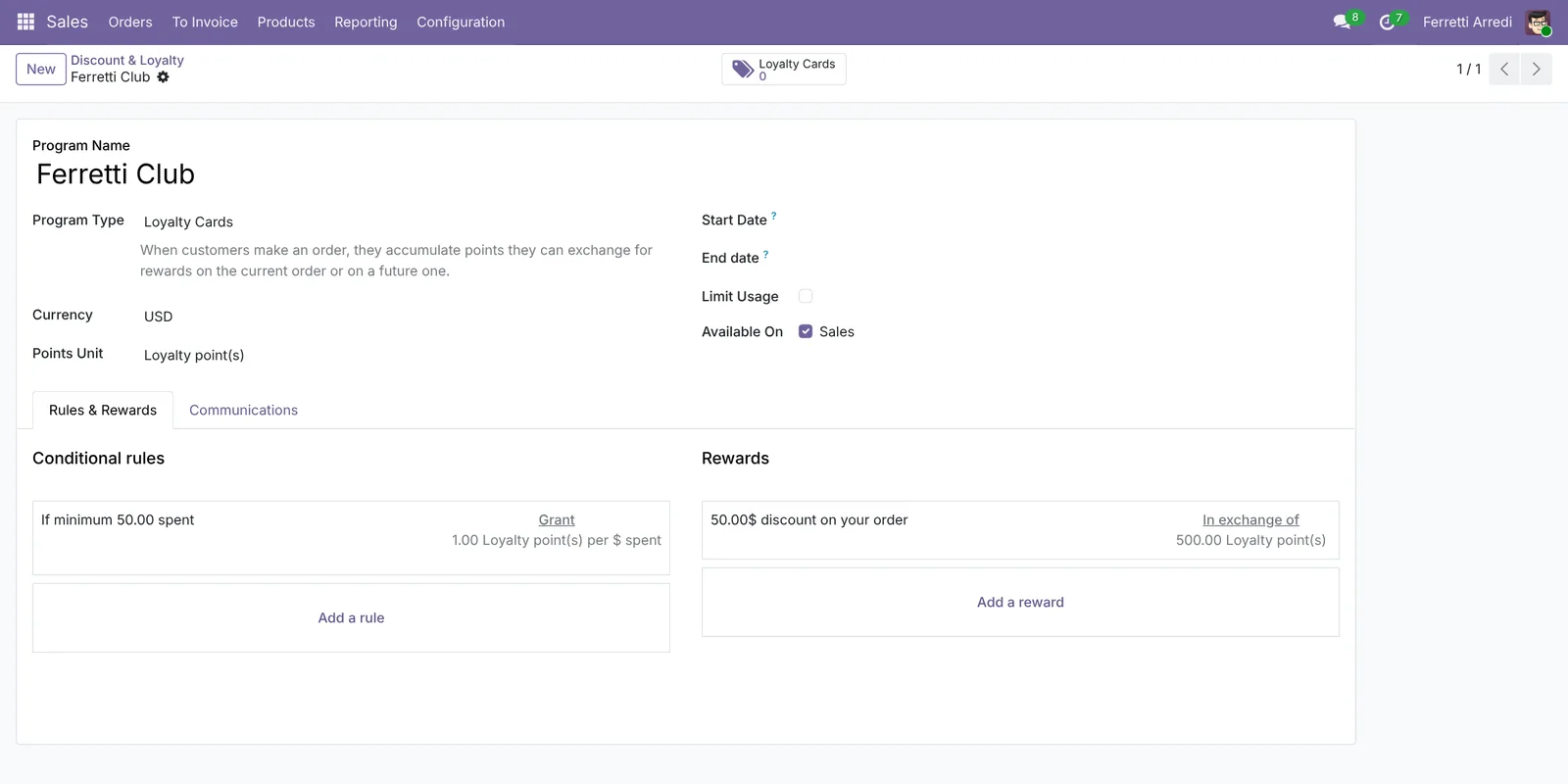 Every dollar is a point; 500 points are worth $50.
3. Add a promotion
Press New again: Autumn sale: 10% over $1,000, Program Type Promotions. Open the rule and set the Minimum Purchase to $1,000. The reward is already 10% on your order. Press Save.
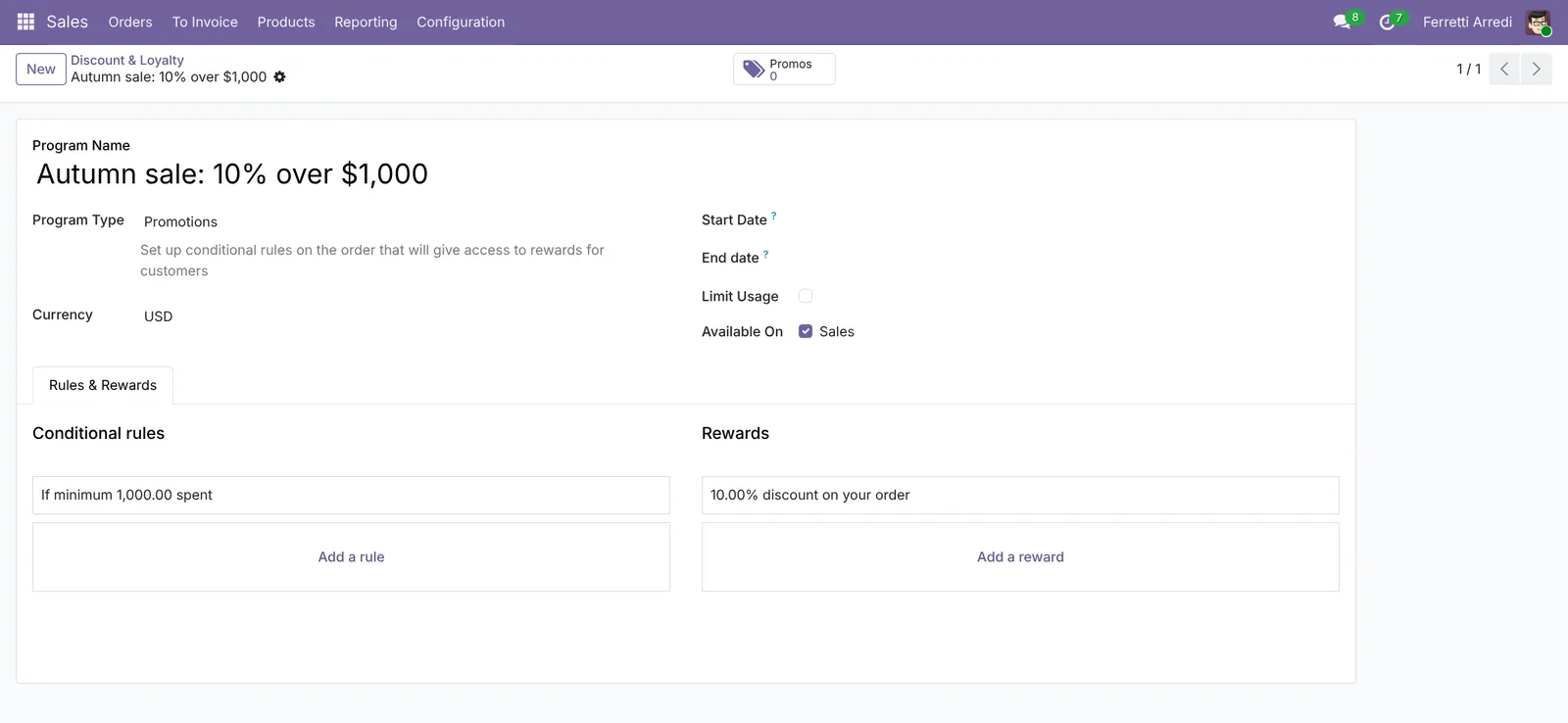 The promotion applies to any order above $1,000, with or without a card.
4. Apply the reward on a quotation
Open Sales → Orders → Quotations, press New, pick Azure Interior and add a Velvet Sofa 3-Seat. Under the lines press Reward: Odoo lists what this order can get. Choose the autumn sale and press Apply.
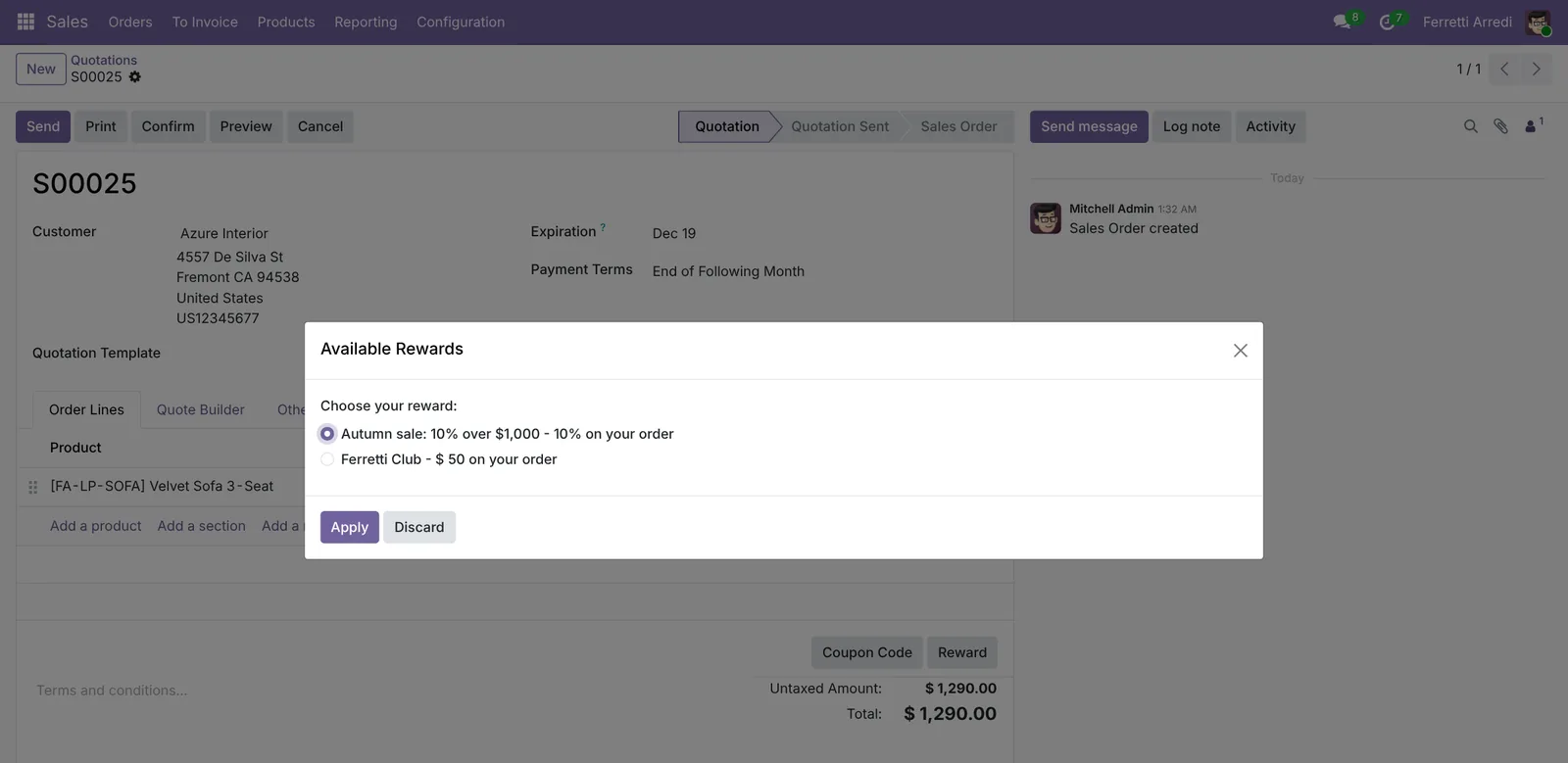 Odoo shows only the rewards this order and this customer can use.
The discount is a line of the order: −$129, total $1,161.
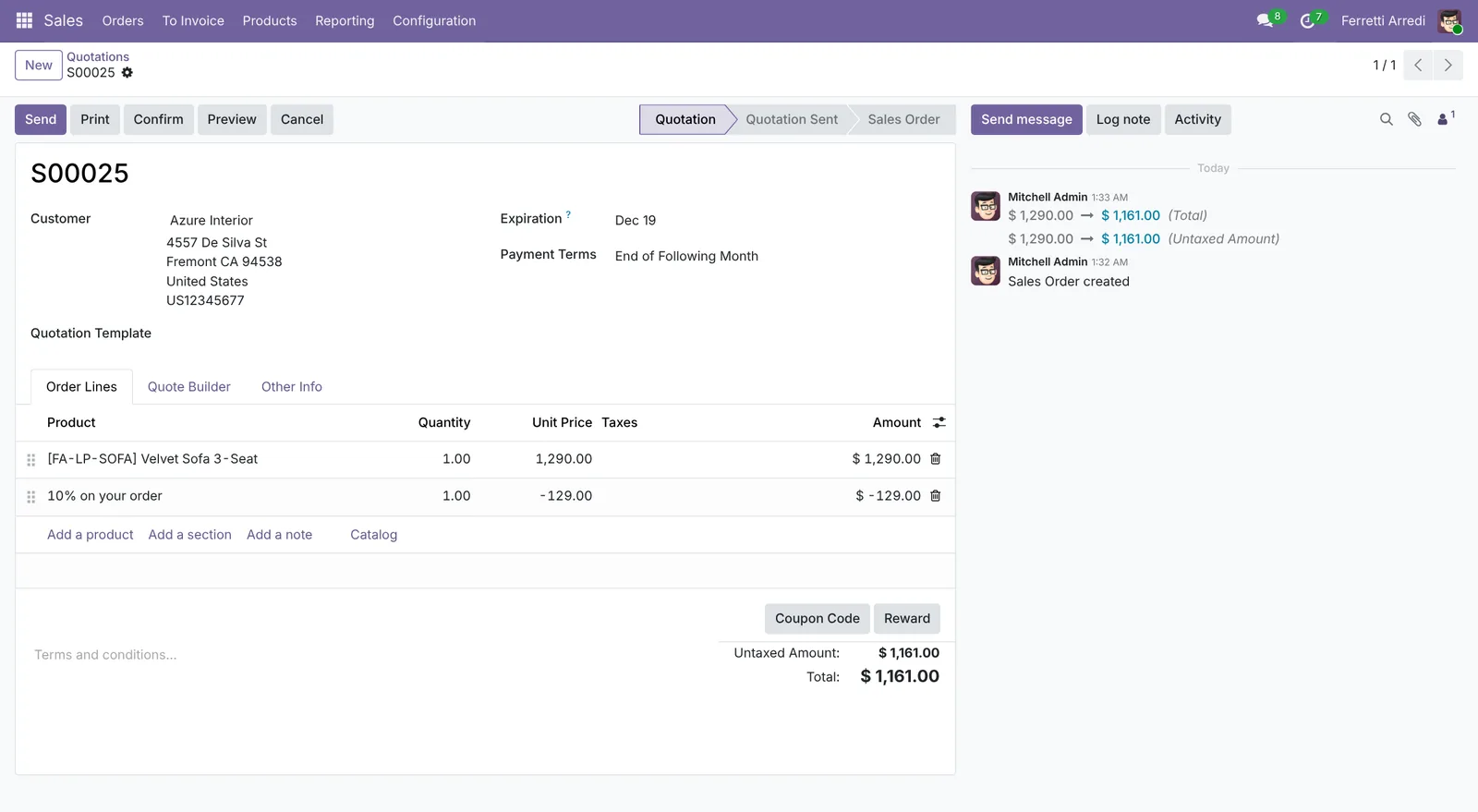 The discount is a line: you see it, and so does the customer.
5. See the points on the card
Confirm the order. On the Ferretti Club program press Loyalty Cards: Azure Interior has a card with 1,161 points, one per dollar of the order after the discount. At 500 points the $50 reward shows up in the Reward button of the next quotation.
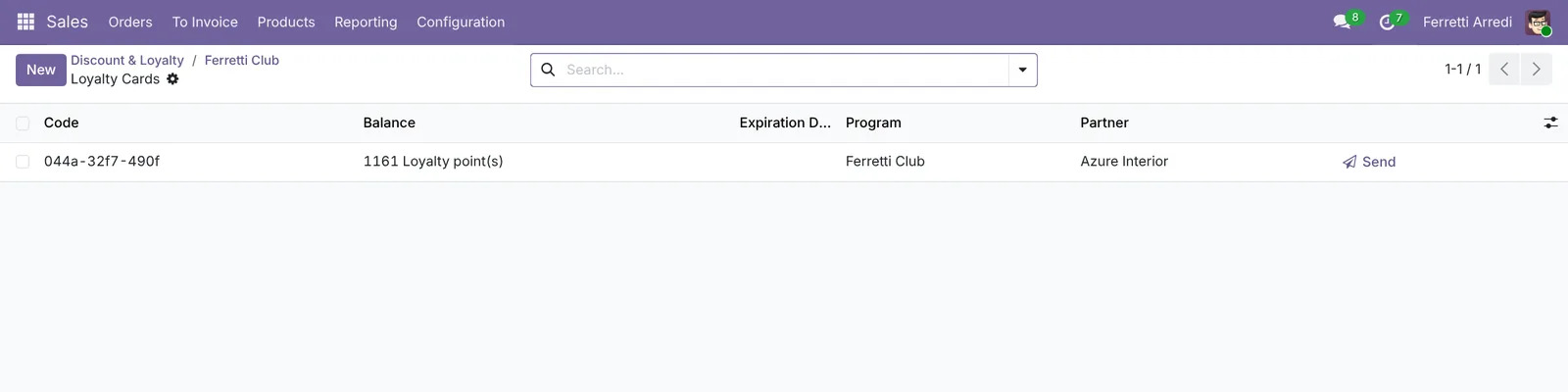 The card fills itself on every confirmed order.
Common mistakes
- A reward nobody reaches. If the average customer needs three years to earn it, the program is invisible. Check what your regular customers spend in a year first.
- Forgetting to tell customers. A card they don’t know about doesn’t bring them back. Use the Communications tab, or write to them.
- Promotions without a minimum. 10% on every order is a price cut, not a promotion.
- Applying the reward after confirming. Apply it on the quotation; on a confirmed order the points are already counted.
Loyalty Programs with AI: ask your AI assistant through MCP
With the Hawklify MCP server, Claude, ChatGPT and other assistants work in your Odoo as you, with your permissions. Odoo counts the points, but it doesn’t tell you which good customers have no card, or who has a reward waiting and stopped ordering. An assistant reads the orders and the cards together.
On the computer. Depending on how your organisation set up the server, the assistant makes the change straight away or first shows you a card to approve. Here Smart mode is on: it reads everything and asks once before creating cards and writing to customers.
Your five best customers this year:
- Deco Addict: $18,400, member (620 points)
- Azure Interior: $14,250, no card
- Gemini Furniture: $11,900, no card
- Lumber Inc: $9,600, member (540 points)
- Wood Corner: $8,300, no card
Create a card with 200 points for the three and write to each on their last order?
Done. Azure Interior, Gemini Furniture and Wood Corner have a Ferretti Club card with 200 points, and each got this note:
Thank you for this year's orders: you are now a Ferretti Club member, with 200 welcome points. Every dollar adds a point, and 500 points are $50 off your next order.
Every Monday, on the phone. A scheduled task asks the assistant at 8:00 and the answer arrives in a chat. Smart mode is on here too.
Hawklify
Your Odoo, from the chat you already use
Send a message, a photo or a voice note: the assistant reads and works in Odoo through Hawklify, with your permissions.
Good morning. 2 members can claim the $50 reward and are quiet:
- Deco Addict: 620 points, last order 40 days ago.
- Lumber Inc: 540 points, last order 75 days ago.
Send each a reminder that their points are worth $50 on the next order?
Yes, send
Sent. Lumber Inc got: You have 540 Ferretti Club points: they are worth $50 off your next order. Shall we prepare a quotation? I'll check again next Monday.
Versions we tested
| Version | Result |
|---|---|
| Odoo 16 | Same steps. The setting is Discounts, Loyalty & Gift Card. On the quotation the button is Promotions, not Reward. |
| Odoo 17 | The setting is Discounts, Loyalty & Gift Card; the rest as in this guide. |
| Odoo 18 | As in this guide. |
| Odoo 19 | As in this guide. The screenshots come from Odoo 19. |
| Odoo 20 | Same steps. The programs are in the Sales → Promotions menu. When the order can get only one reward, Reward applies it straight away, without the reward window. |
Frequently asked questions
What is the difference between a loyalty program and a promotion?
A loyalty program keeps a card per customer: points add up order after order and the customer spends them later. A promotion only looks at the current order: if it meets the rule, such as a minimum amount, the discount applies now.
Where does the customer see the points?
On the loyalty card, which Odoo can e-mail from the Communications tab of the program, on the quotation in the customer portal, and in the Point of Sale and the online shop if they use the same program.
Can points expire?
Each card has an Expiration Date. Set it on the cards, or let an automation or an assistant set it a year after the last order. Odoo doesn't expire points by itself at a fixed age.
Can a customer use a promotion and the loyalty reward on the same order?
Yes, each reward is a separate discount line. If you don't want them together, limit the promotion with a rule, or remove the line before you confirm.
Questa guida è disponibile anche in italiano: Programmi fedeltà in Odoo: punti, premi e promozioni
Related Odoo guides
 SalesSales orders in Odoo: from quotation to invoiceTake a sale through Odoo from start to finish: create the quotation, confirm the order, deliver the goods and post the invoice. Community and Enterprise.
 MarketingEmail marketing in Odoo: newsletters that get readSend newsletters with Odoo Email Marketing: a mailing list, contacts pasted in one go, a mailing from a layout, a test email, and who opened and clicked.
 SalesSales analysis in Odoo: a report that answers questionsTurn Odoo's sales analysis into a pivot table of customers by month, open the orders behind any number and save the report as a favorite. Community and Enterprise.