Inventory valuation in Odoo: what your stock is worth
Set the costing method in Odoo, see where a product's cost comes from, and read the value of everything in stock, product by product. Community and Enterprise.
- Community and Enterprise
- 3 min read
- Odoo + AI tutorial
Your accountant asks what the stock is worth at the end of the month. The answer is not the sales price of everything on the shelves: it is what the goods cost you. In Odoo, every product carries a cost, the costing method decides how that cost follows your purchases, and one report adds it all up. This guide sets the costing method, checks a product’s cost, and reads the value of the stock.
It works the same in Community and Enterprise. The versions we tested are listed at the end.
This guide is also an AI tutorial. At the end, an AI assistant connected to Odoo finds the dead stock on your shelves and the money stuck in it, prepares a clearance price list after your approval, and stops a slow product from being reordered.See it in action ↓Before you start
- The Inventory and Invoicing (or Accounting) apps installed, with products in stock. Here, six products of the category Living.
- An Odoo user with the Inventory / Administrator access right.
1. The costing method
The costing method is set on the product category. Open Inventory → Configuration → Categories and open Living.
Set Costing Method to Average Cost (AVCO): every purchase updates the product’s cost with the price you paid. Save.
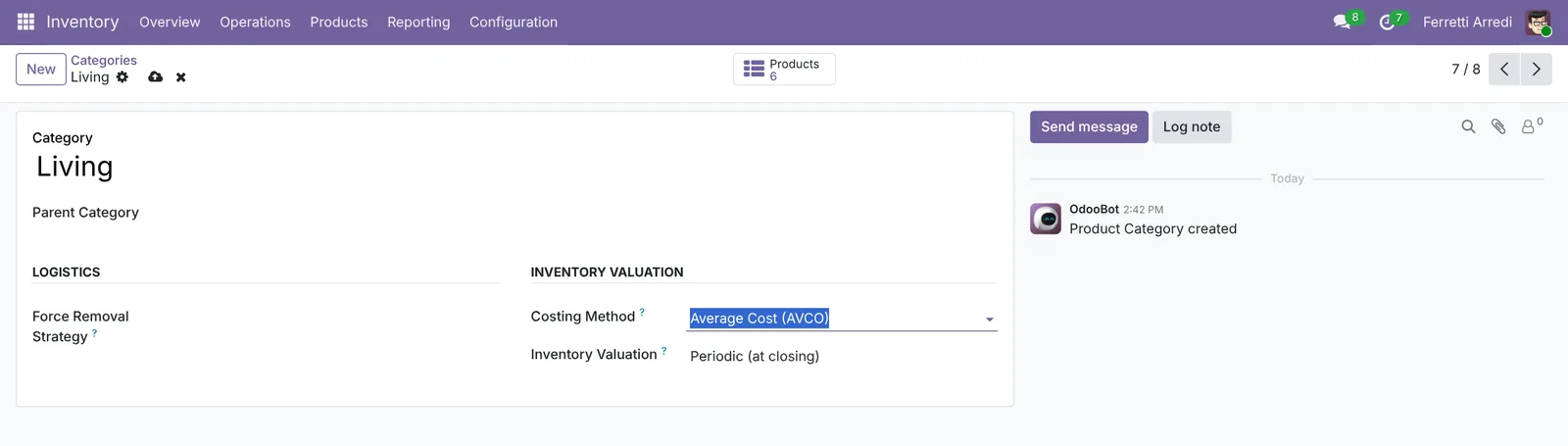 One setting for every product of the category.
2. The cost of a product
Open Inventory → Products → Products and open the Walnut Sideboard. The Cost field is the value of one unit: $380.00. The Sales Price, $790.00, plays no part in the value of the stock.
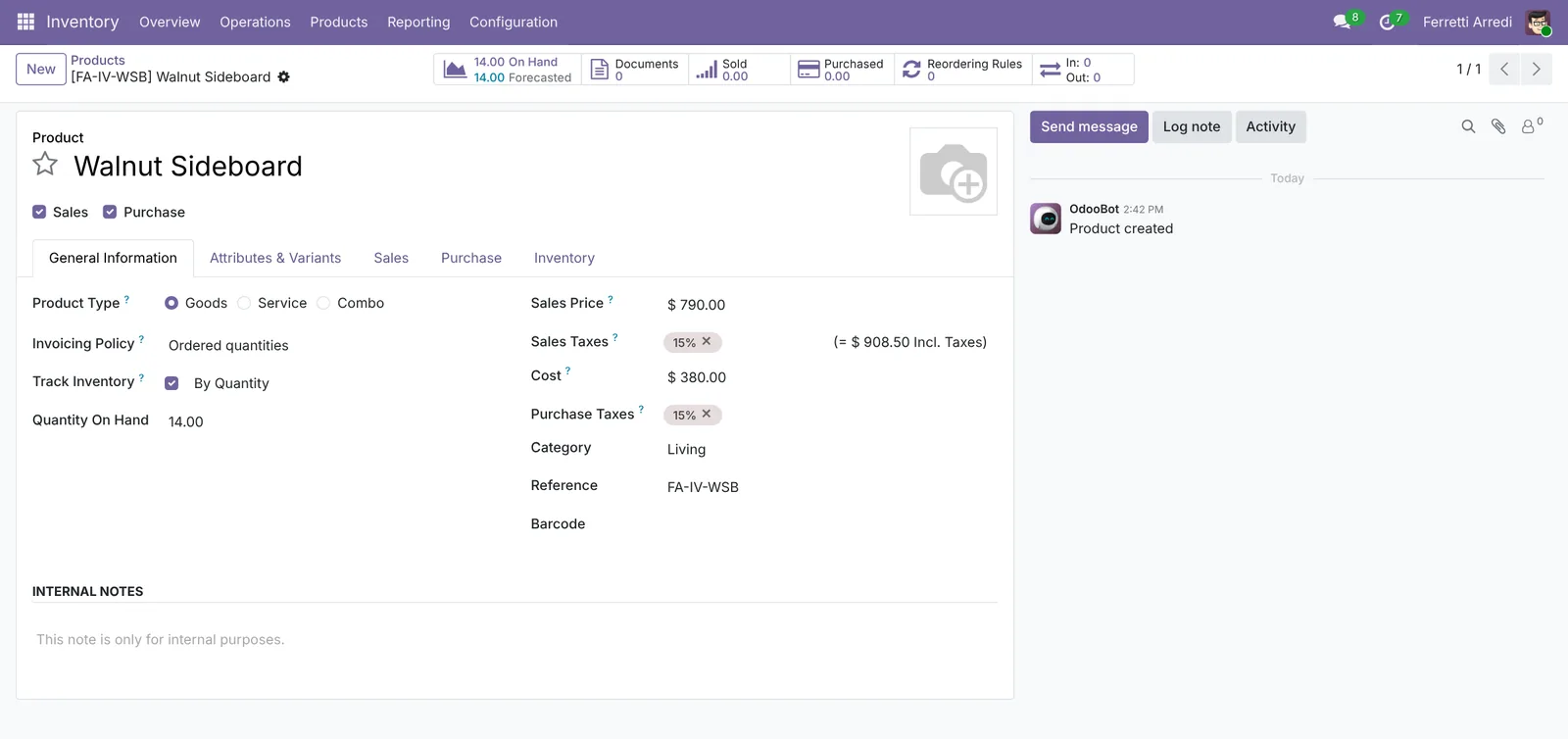 The cost, not the price, values the stock.
With Average Cost, you don’t type the cost: Odoo computes it from the purchases you receive.
3. The value of your stock
Open Inventory → Reporting → Stock and pick Living in the Category panel on the left. Each line shows the Unit Cost, the Total Value and the quantity On Hand. The total at the bottom is the value of the category: $16,810.
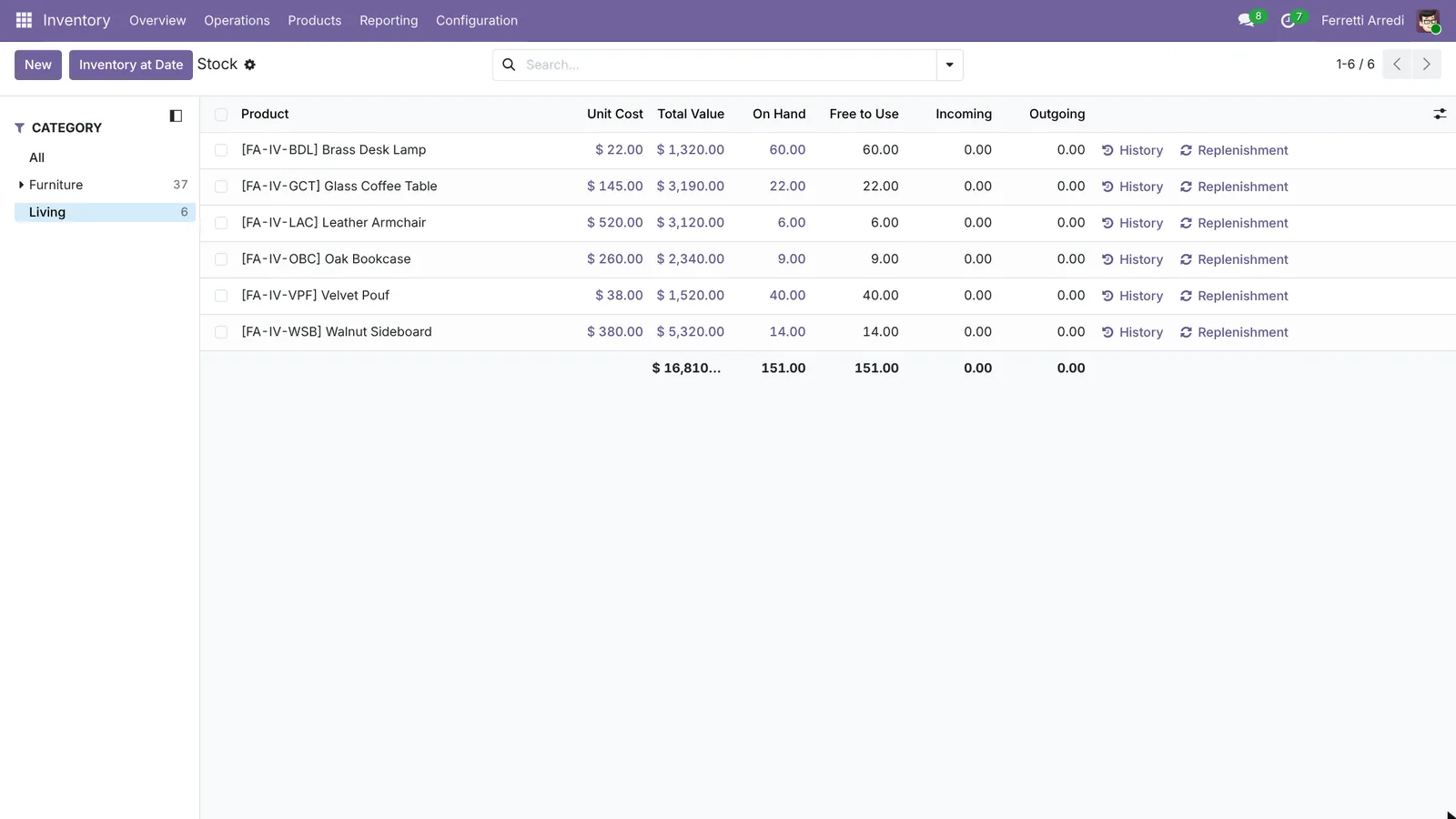 $16,810 of furniture on the shelves.
Group by category, or remove the panel filter, to see the value of the whole warehouse.
Common mistakes
- Products without a cost. A product with an empty cost is worth zero in the report. Check the Unit Cost column for zeros.
- Changing the method in the middle of the year. Odoo revalues the stock the moment you change it. Do it at the end of a period.
- One category for everything. The costing method is per category: put the products you buy at changing prices in an Average Cost or FIFO category.
- Reading the value as profit. The report says what the stock cost you, not what it will sell for, nor how long it has been sitting there.
Inventory valuation with AI: ask your AI assistant through MCP
With the Hawklify MCP server, Claude, ChatGPT and other assistants work in your Odoo as you, with your permissions. The stock report shows what you have, not what’s stuck. Products that haven’t moved for months tie up your money, and finding them means opening the history of every product. The assistant checks every last move, and prepares the clearance prices in a card you approve: card mode is on here.
3 products haven't moved since before May 14, $10,030.00 at cost:
Walnut Sideboard: 14 at $380.00, $5,320.00, last move March 2.Glass Coffee Table: 22 at $145.00, $3,190.00, last move February 10.Velvet Pouf: 40 at $38.00, $1,520.00, last move April 20.
The Leather Armchair last moved on May 30: slow, not dead. Oak Bookcase and Brass Desk Lamp move every week.
Approval needed in OdooCreate
Create the price list Clearance -30% with 30% off the three products that have not moved for six months: Walnut Sideboard, Glass Coffee Table, Velvet Pouf.
product.pricelist · 1 record
New price list
| Field | Current | New |
|---|---|---|
| Pricelist Name | Clearance -30% | |
| Price Rules | 30% off: Walnut Sideboard, Glass Coffee Table, Velvet Pouf |
Change applied in Odoo.
Organisation administrators can turn the approval cards off on the Members page.
The price list Clearance -30% is ready: the three products at 30% off. Use it on a quotation or in your shop when you run the promotion.
On the stock report. In a side panel of the browser, the assistant starts from the report you are reading: a slow product that Odoo would still reorder, compared with its real sales, and its reordering rule fixed once you say yes.
Yes. Its reordering rule says min 4, max 10, and you sold 2 in six months. With 6 on hand, three more sales would trigger an order of 7 more armchairs, $3,640 at cost.
Shall I lower the rule to min 1, max 3?
Done. The Leather Armchair now reorders only below 1, up to 3. With today's 6 on hand, Odoo won't buy any for months.
Versions we tested
| Version | Result |
|---|---|
| Odoo 16 | Same steps. The menu is Product Categories, and the category also shows Inventory Valuation: Manual or Automated. |
| Odoo 17 | Like 16. |
| Odoo 18 | Like 16. |
| Odoo 19 | As in this guide. Inventory at Date in the stock report shows the value on a past date. The screenshots come from Odoo 19. |
| Odoo 20 | Same steps. The costing method is in the category’s Accounting tab, for users with accounting access. The stock report has an Inventory at Date panel. |
Frequently asked questions
Standard Price, Average Cost or FIFO?
Standard Price keeps the cost you type. Average Cost updates it with every purchase. FIFO values each unit at the price it was bought. Average Cost is the simplest choice when purchase prices change.
Can I change the costing method later?
Yes, but Odoo revalues the products in stock at that moment. Change it at the end of a period, and tell your accountant.
Why is the Total Value zero for some products?
Their Cost is empty. Fill in the Cost on the product, or receive a purchase with Average Cost or FIFO.
Do I need Odoo Accounting?
No. Inventory with the Invoicing app is enough for the costing method and the stock value. Accounting adds the journal entries of the stock, for automated valuation.
Questa guida è disponibile anche in italiano: Valorizzazione magazzino Odoo: quanto vale davvero
Related Odoo guides
 InventoryLanded costs in Odoo: freight and duties in product costAdd freight, duties and customs to product cost in Odoo with landed costs: the setting, the costing method, the carrier's bill and the split. Community and Enterprise.
 InventoryReordering rules in Odoo: restock before you run outSet min/max reordering rules in Odoo so it orders from your vendor before stock runs out, then use the Replenishment list to order now. Community and Enterprise.
 InventoryWarehouse setup in Odoo: locations and multi-step routesTurn on storage locations and multi-step routes in Odoo, then receive goods in 2 steps and ship them in 3: pick, pack and deliver. Community and Enterprise.